We've captured the moments from FabCon & SQLCon that everyone is talking about, and we are bringing them to the community, live and on-demand. Starts on April 14th. Register now
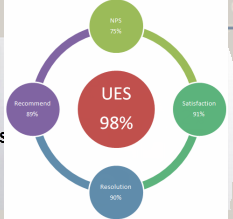
Below is the image provided by client, can someone help me out to best way to present data in Power BI, I'm looking how we can show case data and which graph is good
I have five columns (NPS,recommend,Satisfaction,UES,Resolution) and date slicer, any help much appreciated, Thanks
If the client wants that exact image, just import it without the measures as an Image. After positioning it in the report, use separate Card visuals and overlay them on top of the image in the appropriate positions.
i guess this works! but is there any graph related to image?, if possible let me know
In terms of using it in one chart, you could also load an image as the background for a scatterplot, and then create a coordinate system for your measures so that they appear as points around the circle.
If you have recently started exploring Fabric, we'd love to hear how it's going. Your feedback can help with product improvements.
A new Power BI DataViz World Championship is coming this June! Don't miss out on submitting your entry.
Share feedback directly with Fabric product managers, participate in targeted research studies and influence the Fabric roadmap.
| User | Count |
|---|---|
| 54 | |
| 39 | |
| 32 | |
| 17 | |
| 15 |
| User | Count |
|---|---|
| 64 | |
| 63 | |
| 37 | |
| 36 | |
| 22 |