cancel
Showing results for 
Search instead for 
Did you mean: 

Did you hear? There's a new SQL AI Developer certification (DP-800). Start preparing now and be one of the first to get certified. Register now

Reply
Anonymous
Not applicable

visual dates

I have a very simple table with a simple Visual, but there are a several things that arent appearing as i would like.

The data isnt lining up with the dates on X axis.  In the picture 366 tonns should have 08 APRIL below it but has 07 Apr to the left of it. 

I would also like the first date to also appear on the graph, which would be 01 Apr


Thanks in advance

CaptureDD.PNG

1 ACCEPTED SOLUTION
Gordonlilj
Solution Sage
Solution Sage

Hi,


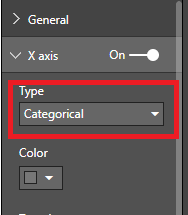
You could try and switch from continuous to categorical under the x axis in the format panel

Capture.PNG

View solution in original post

3 REPLIES 3
Gordonlilj
Solution Sage
Solution Sage

Hi,


You could try and switch from continuous to categorical under the x axis in the format panel

Capture.PNG

Anonymous
Not applicable

That seems to have the data displaying better now.

Strange that continious would have that effect though.


Thanks for the help.

In you case continious is showing the data correctly but it can be a bit misleading at times in the way continious is visualized in Power Bi

Helpful resources

Announcements
April Power BI Update Carousel

Power BI Monthly Update - April 2026

Check out the April 2026 Power BI update to learn about new features.

Fabric SQL PBI Data Days

Data Days 2026 coming soon!

Sign up to receive a private message when registration opens and key events begin.

New to Fabric survey Carousel

New to Fabric Survey

If you have recently started exploring Fabric, we'd love to hear how it's going. Your feedback can help with product improvements.

Power BI DataViz World Championships carousel

Power BI DataViz World Championships - June 2026

A new Power BI DataViz World Championship is coming this June! Don't miss out on submitting your entry.