This is best Fabric, Power BI, SQL and AI community event. How do we know? The last event sold out! Save €200 with code FABCMTY200.
Register nowLevel up your Power BI skills this month - build one visual each week and tell better stories with data! Get started
I have a very simple table with a simple Visual, but there are a several things that arent appearing as i would like.
The data isnt lining up with the dates on X axis. In the picture 366 tonns should have 08 APRIL below it but has 07 Apr to the left of it.
I would also like the first date to also appear on the graph, which would be 01 Apr
Thanks in advance
Solved! Go to Solution.
Hi,
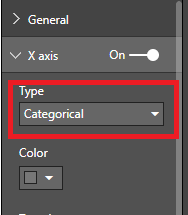
You could try and switch from continuous to categorical under the x axis in the format panel
Hi,
You could try and switch from continuous to categorical under the x axis in the format panel
That seems to have the data displaying better now.
Strange that continious would have that effect though.
Thanks for the help.
In you case continious is showing the data correctly but it can be a bit misleading at times in the way continious is visualized in Power Bi
Sign up to receive a private message when registration opens and key events begin.
If you have recently started exploring Fabric, we'd love to hear how it's going. Your feedback can help with product improvements.
| User | Count |
|---|---|
| 33 | |
| 25 | |
| 23 | |
| 20 | |
| 15 |
| User | Count |
|---|---|
| 64 | |
| 41 | |
| 27 | |
| 22 | |
| 20 |