Get certified for free when you join Fabric Data Days 2026 and dive into Fabric, Power BI, SQL, AI, and other essential data skills.
Join nowTry your skills in the Power BI Dataviz World Championship! Round one ends June 26. Join now
I have a very simple table with a simple Visual, but there are a several things that arent appearing as i would like.
The data isnt lining up with the dates on X axis. In the picture 366 tonns should have 08 APRIL below it but has 07 Apr to the left of it.
I would also like the first date to also appear on the graph, which would be 01 Apr
Thanks in advance
Solved! Go to Solution.
Hi,
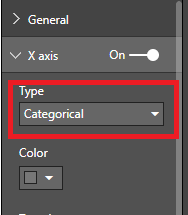
You could try and switch from continuous to categorical under the x axis in the format panel
Hi,
You could try and switch from continuous to categorical under the x axis in the format panel
That seems to have the data displaying better now.
Strange that continious would have that effect though.
Thanks for the help.
In you case continious is showing the data correctly but it can be a bit misleading at times in the way continious is visualized in Power Bi
Don't miss out on Data Days, June 15 through August 7. Learn Fabric, Power BI, SQL, AI and more.
Check out the May 2026 Power BI update to learn about new features.
| User | Count |
|---|---|
| 24 | |
| 22 | |
| 21 | |
| 20 | |
| 14 |
| User | Count |
|---|---|
| 58 | |
| 52 | |
| 41 | |
| 33 | |
| 31 |