Join us at FabCon Atlanta from March 16 - 20, 2026, for the ultimate Fabric, Power BI, AI and SQL community-led event. Save $200 with code FABCOMM.
Register now!Learn from the best! Meet the four finalists headed to the FINALS of the Power BI Dataviz World Championships! Register now
I have two spreadsheets
2018 data
2019 data
When I create a clustered column chart to compare YOY by month, I run into a few issues.
Fields are populated as follows:
Axis
2018 Date of Incident (ordered by date hierarchy)
2019 Date of Incident (ordered by date hierarchy)
Value
2018 Surname of Injured Person
2019 Surname of Injured Person
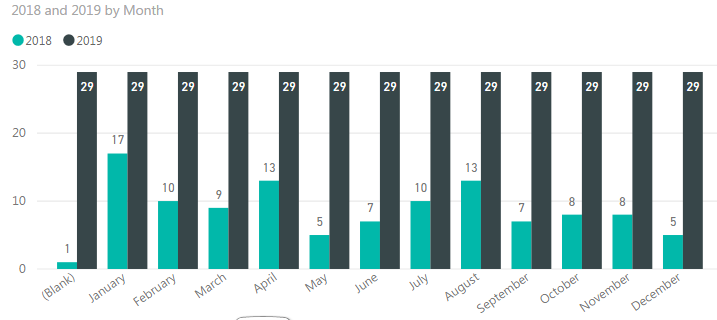
When I do that, it shows the below.
2018 data is correct however 2019 is showing as 29 for all months. 29 is the number of rows, it's not actually counting the amount of 2019 incidents per month.
I'm stuck, please help! 🙂
You're going to need to combine the two sets of data somehow - either merge the queries, or create some sort of linking table listing the months. Right now I'm guessing they are separated and you just have a list of months on the 2018 table, Power BI's not going to know which of those months the 2019 data applies to so it does it for all of them
Do you know how to create a linking table listing the months?
Share feedback directly with Fabric product managers, participate in targeted research studies and influence the Fabric roadmap.
Check out the February 2026 Power BI update to learn about new features.
| User | Count |
|---|---|
| 61 | |
| 59 | |
| 42 | |
| 18 | |
| 15 |
| User | Count |
|---|---|
| 107 | |
| 100 | |
| 38 | |
| 29 | |
| 29 |