Don't miss your chance to take the Fabric Data Engineer (DP-700) exam on us!
Learn moreWe've captured the moments from FabCon & SQLCon that everyone is talking about, and we are bringing them to the community, live and on-demand. Starts on April 14th. Register now
Hi,
I am trying to calculate how long it takes for incoming tickets to be resolved excluding weekends and holidays. I posted earlier a message about this but the data columns were old so I am trying to get a solution for my problem. Since I just started using Power BI, please give a solution in baby steps. 
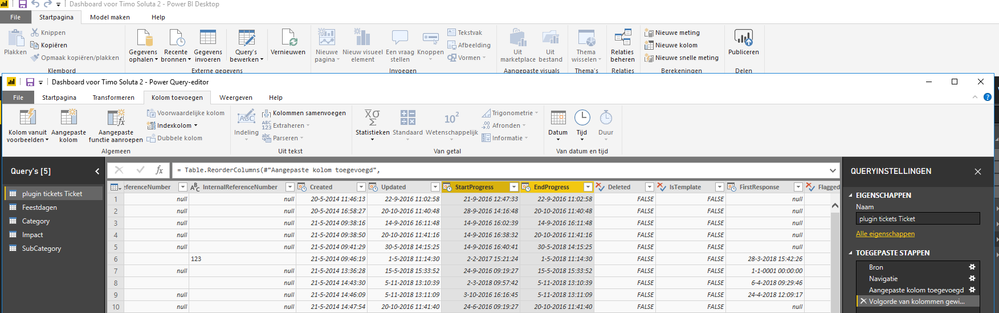
I have highlighted the 2 columns which I need:
Thanks very much,
Shahbaaz
See if Net Work Days helps: https://community.powerbi.com/t5/Quick-Measures-Gallery/Net-Work-Days/m-p/367362
Do you by any chance have a file with the solution where I check the DAX formula etc.?
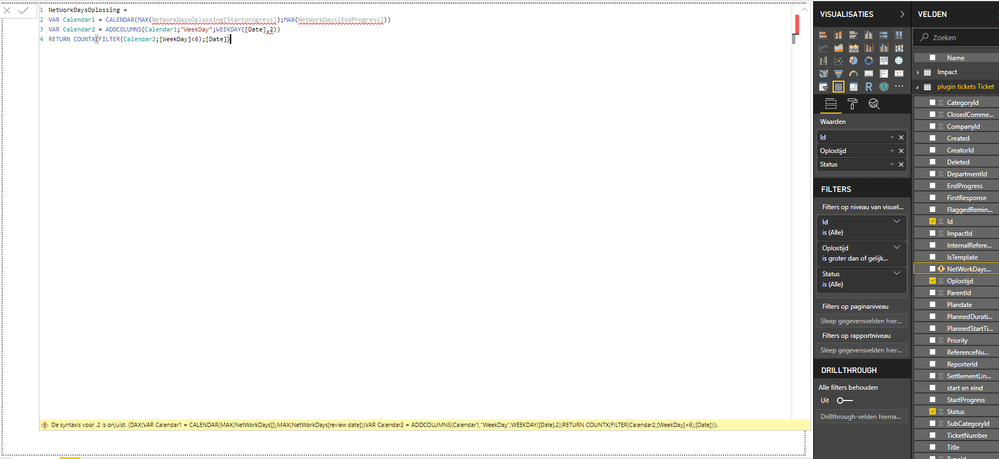
Hi Greg, thanks for you message. Unfortunately I keep getting the following syntax error and I have now clue why. I have just changed the name of the measure and thats it. Please help me
Seems like your table name is incorrect and it should be the one that is highlighted in yellow in your image. Also, you will need to update ","'s to ";" in your third line (including the name of your measure)
If you have recently started exploring Fabric, we'd love to hear how it's going. Your feedback can help with product improvements.
A new Power BI DataViz World Championship is coming this June! Don't miss out on submitting your entry.
Share feedback directly with Fabric product managers, participate in targeted research studies and influence the Fabric roadmap.
| User | Count |
|---|---|
| 52 | |
| 38 | |
| 37 | |
| 19 | |
| 18 |
| User | Count |
|---|---|
| 66 | |
| 63 | |
| 34 | |
| 32 | |
| 21 |