This time we’re going bigger than ever. Fabric, Power BI, SQL, AI and more. We're covering it all. You won't want to miss it.
Learn moreDid you hear? There's a new SQL AI Developer certification (DP-800). Start preparing now and be one of the first to get certified. Register now
Hi,
I am trying to calculate how long it takes for incoming tickets to be resolved excluding weekends and holidays. I posted earlier a message about this but the data columns were old so I am trying to get a solution for my problem. Since I just started using Power BI, please give a solution in baby steps. 
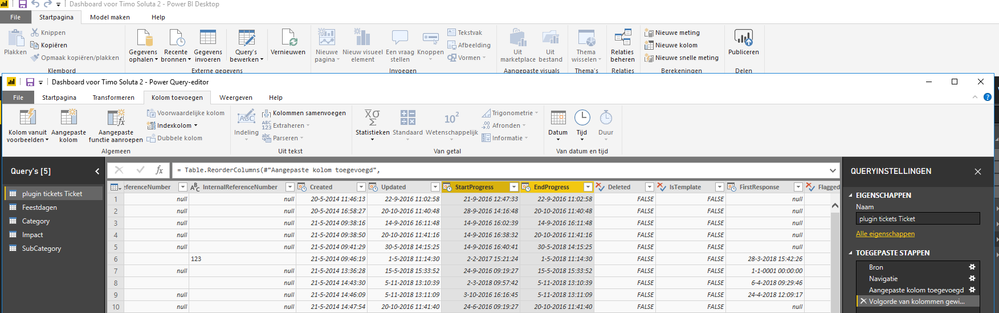
I have highlighted the 2 columns which I need:
Thanks very much,
Shahbaaz
See if Net Work Days helps: https://community.powerbi.com/t5/Quick-Measures-Gallery/Net-Work-Days/m-p/367362
Do you by any chance have a file with the solution where I check the DAX formula etc.?
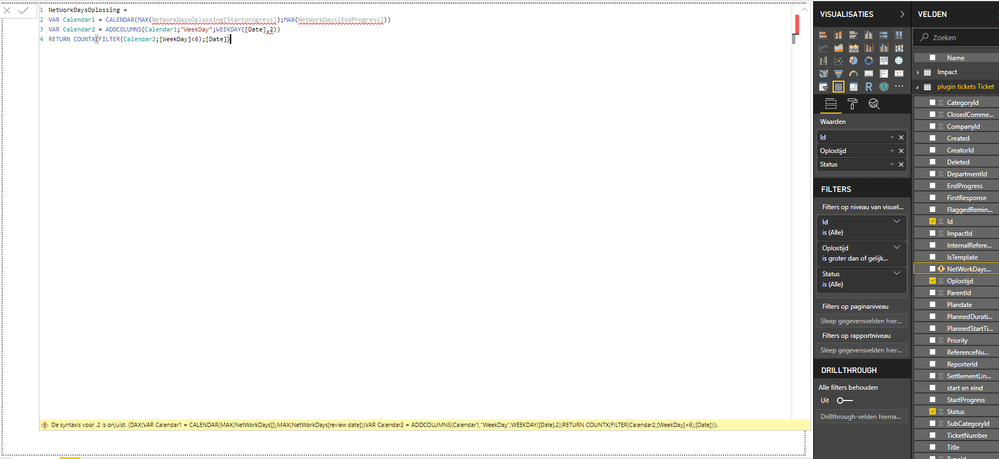
Hi Greg, thanks for you message. Unfortunately I keep getting the following syntax error and I have now clue why. I have just changed the name of the measure and thats it. Please help me
Seems like your table name is incorrect and it should be the one that is highlighted in yellow in your image. Also, you will need to update ","'s to ";" in your third line (including the name of your measure)
Check out the April 2026 Power BI update to learn about new features.
Sign up to receive a private message when registration opens and key events begin.
If you have recently started exploring Fabric, we'd love to hear how it's going. Your feedback can help with product improvements.
| User | Count |
|---|---|
| 34 | |
| 31 | |
| 30 | |
| 21 | |
| 16 |
| User | Count |
|---|---|
| 65 | |
| 53 | |
| 31 | |
| 23 | |
| 23 |