Get certified for free when you join Fabric Data Days 2026 and dive into Fabric, Power BI, SQL, AI, and other essential data skills.
Join nowJuly 7 - July 17 | Round 2 of the Power BI Dataviz World Championships. Don't miss your chance! Learn more
null
Hi,
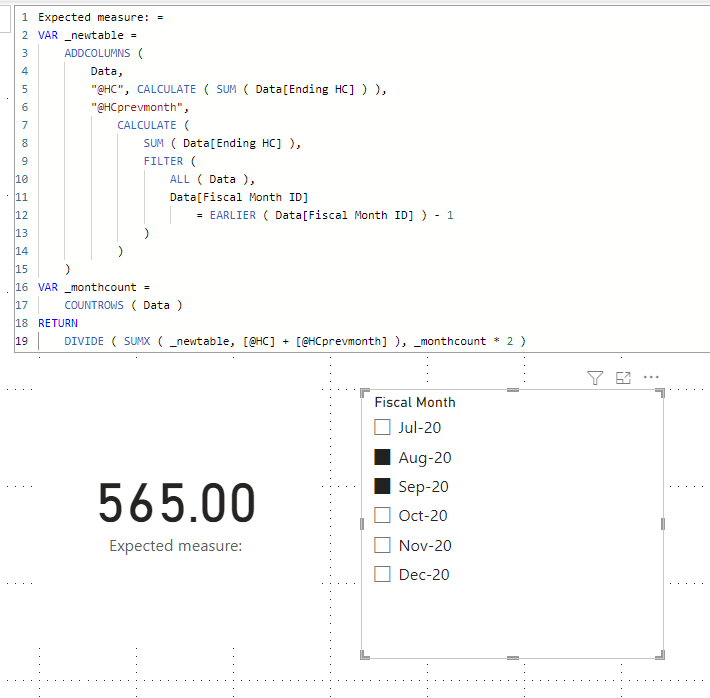
I am not sure if I understood your question correctly, but please check the below picture and the attached pbix file.
Expected measure: =
VAR _newtable =
ADDCOLUMNS (
Data,
"@HC", CALCULATE ( SUM ( Data[Ending HC] ) ),
"@HCprevmonth",
CALCULATE (
SUM ( Data[Ending HC] ),
FILTER (
ALL ( Data ),
Data[Fiscal Month ID]
= EARLIER ( Data[Fiscal Month ID] ) - 1
)
)
)
VAR _monthcount =
COUNTROWS ( Data )
RETURN
DIVIDE ( SUMX ( _newtable, [@HC] + [@HCprevmonth] ), _monthcount * 2 )
Do you have an alternative to the earlier function as that does not work
Hi,
Please try the below, and check the attached file.
Expected measure V2: =
VAR _newtable =
ADDCOLUMNS (
Data,
"@HC", CALCULATE ( SUM ( Data[Ending HC] ) ),
"@HCprevmonth",
CALCULATE (
SUMX (
FILTER (
ALL ( Data ),
Data[Fiscal Month ID]
= MAX ( Data[Fiscal Month ID] ) - 1
),
Data[Ending HC]
)
)
)
VAR _monthcount =
COUNTROWS ( Data )
RETURN
DIVIDE ( SUMX ( _newtable, [@HC] + [@HCprevmonth] ), _monthcount * 2 )
It works in the pbix file but getting odd results in my measure
Hi,
Please share your sample pbix file's link.
Thanks.
Join us in Barcelona for FabCon and SQLCon, the Fabric, Power BI, SQL, and AI community event. Save €200 with code FABCMTY200.
Join Fabric Data Days 2026: 60 days of free live/on-demand sessions, challenges, study groups, and certification opportunities.
| User | Count |
|---|---|
| 23 | |
| 22 | |
| 18 | |
| 17 | |
| 13 |
| User | Count |
|---|---|
| 63 | |
| 44 | |
| 42 | |
| 40 | |
| 39 |