Join us at FabCon Atlanta from March 16 - 20, 2026, for the ultimate Fabric, Power BI, AI and SQL community-led event. Save $200 with code FABCOMM.
Register now!Learn from the best! Meet the four finalists headed to the FINALS of the Power BI Dataviz World Championships! Register now
im looking to see if anyone has figured a way to add multiple trend lines on one line chart. for example, i have one line showing fees for 2015 and another line for fees for 2016. I would like to compare trends, so id like a trend line for the year 2015 and one for 2016 individually, but all on the same chart. any ideas?
Solved! Go to Solution.
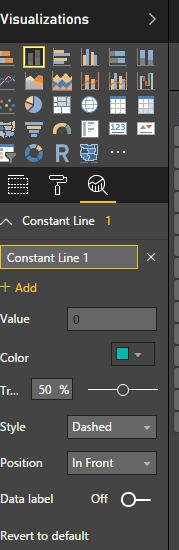
In new release, Power BI has provided option to add multiple trend lines. Please see below image where new options are available under Visualiazations area.
I am getting the update now!
Thanks Habib
Did you manage with the new update? If yes, how?
Share feedback directly with Fabric product managers, participate in targeted research studies and influence the Fabric roadmap.
Check out the February 2026 Power BI update to learn about new features.
| User | Count |
|---|---|
| 61 | |
| 54 | |
| 38 | |
| 16 | |
| 15 |
| User | Count |
|---|---|
| 94 | |
| 84 | |
| 33 | |
| 32 | |
| 25 |