This time we’re going bigger than ever. Fabric, Power BI, SQL, AI and more. We're covering it all. You won't want to miss it.
Learn moreJoin the FabCon + SQLCon recap series. Up next: Power BI, Real-Time Intelligence, IQ and AI, and Data Factory take center stage. All sessions are available on-demand after the live show. Register now
im looking to see if anyone has figured a way to add multiple trend lines on one line chart. for example, i have one line showing fees for 2015 and another line for fees for 2016. I would like to compare trends, so id like a trend line for the year 2015 and one for 2016 individually, but all on the same chart. any ideas?
Solved! Go to Solution.
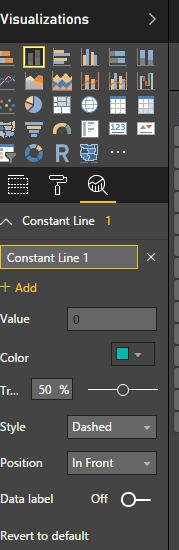
In new release, Power BI has provided option to add multiple trend lines. Please see below image where new options are available under Visualiazations area.
I am getting the update now!
Thanks Habib
Did you manage with the new update? If yes, how?
Check out the April 2026 Power BI update to learn about new features.
If you have recently started exploring Fabric, we'd love to hear how it's going. Your feedback can help with product improvements.
A new Power BI DataViz World Championship is coming this June! Don't miss out on submitting your entry.
| User | Count |
|---|---|
| 40 | |
| 37 | |
| 31 | |
| 23 | |
| 15 |
| User | Count |
|---|---|
| 74 | |
| 58 | |
| 31 | |
| 31 | |
| 23 |