cancel
Showing results for 
Search instead for 
Did you mean: 

Did you hear? There's a new SQL AI Developer certification (DP-800). Start preparing now and be one of the first to get certified. Register now

Reply
EdJ
New Member

inserting missing rows in data

Hi, I have an issue I'm trying to work through. 

I have a list which is updated daily of bank balances, with numerous bank accounts. However, some bank accountants don't necessarily have a new bank balance all 5 working days but we need those missing days.

Also, after completing the list, I need a total balance of all bank balances per day.

Here is how the data currently looks including what I need (except total balance of all bank balances per day):


pbi.png


I's like to see a suggestion for how this can be done.

Thank you for any help you can provide!

1 ACCEPTED SOLUTION
v-zhenbw-msft
Community Support
Community Support

Hi @EdJ ,


We can create a new table and two new columns to meet your requirement.


1. Create a new table that contains whole date and name.


Result table = 
CROSSJOIN(
    VALUES('Table'[Name]),
    VALUES('Table'[Date]))
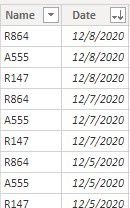
 

in1.jpg


2. Then we need to add the value column.


Value = 
CALCULATE(SUM('Table'[Value]),FILTER('Table','Table'[Date]='Result table'[Date] && 'Table'[Name]= 'Result table'[Name]))


in2.jpg


3. At last we can create the result column.


Column = 
VAR _date =
    IF (
        ISBLANK ( 'Result table'[Value] ),
        MAXX (
            FILTER (
                'Result table',
                'Result table'[Date] < EARLIER ( 'Result table'[Date] )
                    && 'Result table'[Value] <> BLANK ()
                    && 'Result table'[Name] = EARLIER ( 'Result table'[Name] )
            ),
            'Result table'[Date]
        ),
        'Result table'[Date]
    )
RETURN
    IF (
        ISBLANK ( 'Result table'[Value] ),
        CALCULATE (
            SUM ( 'Result table'[Value] ),
            FILTER (
                'Result table',
                'Result table'[Date] = _date
                    && 'Result table'[Name] = EARLIER ( 'Result table'[Name] )
            )
        ),
        CALCULATE ( SUM ( 'Result table'[Value] ) )
    )
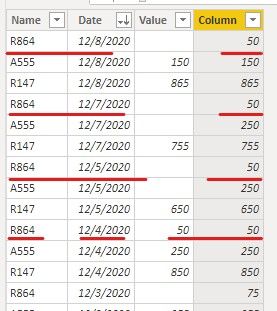
 

in3.jpg


If it doesn’t meet your requirement, could you please show the exact expected result based on the table that you have shared?


Best regards,


Community Support Team _ zhenbw

If this post helps, then please consider Accept it as the solution to help the other members find it more quickly.


BTW, pbix as attached.

View solution in original post

2 REPLIES 2
v-zhenbw-msft
Community Support
Community Support

Hi @EdJ ,


We can create a new table and two new columns to meet your requirement.


1. Create a new table that contains whole date and name.


Result table = 
CROSSJOIN(
    VALUES('Table'[Name]),
    VALUES('Table'[Date]))


in1.jpg


2. Then we need to add the value column.


Value = 
CALCULATE(SUM('Table'[Value]),FILTER('Table','Table'[Date]='Result table'[Date] && 'Table'[Name]= 'Result table'[Name]))


in2.jpg


3. At last we can create the result column.


Column = 
VAR _date =
    IF (
        ISBLANK ( 'Result table'[Value] ),
        MAXX (
            FILTER (
                'Result table',
                'Result table'[Date] < EARLIER ( 'Result table'[Date] )
                    && 'Result table'[Value] <> BLANK ()
                    && 'Result table'[Name] = EARLIER ( 'Result table'[Name] )
            ),
            'Result table'[Date]
        ),
        'Result table'[Date]
    )
RETURN
    IF (
        ISBLANK ( 'Result table'[Value] ),
        CALCULATE (
            SUM ( 'Result table'[Value] ),
            FILTER (
                'Result table',
                'Result table'[Date] = _date
                    && 'Result table'[Name] = EARLIER ( 'Result table'[Name] )
            )
        ),
        CALCULATE ( SUM ( 'Result table'[Value] ) )
    )


in3.jpg


If it doesn’t meet your requirement, could you please show the exact expected result based on the table that you have shared?


Best regards,


Community Support Team _ zhenbw

If this post helps, then please consider Accept it as the solution to help the other members find it more quickly.


BTW, pbix as attached.

AlB
Community Champion
Community Champion

Hi @EdJ 

This can be best done in Power Query

Can you paste the current table in text-tabular format here, instead of a screen cap, so that the contents can be copied easily?

Please mark the question solved when done and consider giving a thumbs up if posts are helpful.

Contact me privately for support with any larger-scale BI needs, tutoring, etc.

Cheers 

SU18_powerbi_badge

Helpful resources

Announcements
April Power BI Update Carousel

Power BI Monthly Update - April 2026

Check out the April 2026 Power BI update to learn about new features.

Fabric SQL PBI Data Days

Data Days 2026 coming soon!

Sign up to receive a private message when registration opens and key events begin.

New to Fabric survey Carousel

New to Fabric Survey

If you have recently started exploring Fabric, we'd love to hear how it's going. Your feedback can help with product improvements.

Power BI DataViz World Championships carousel

Power BI DataViz World Championships - June 2026

A new Power BI DataViz World Championship is coming this June! Don't miss out on submitting your entry.