Join us at FabCon Atlanta from March 16 - 20, 2026, for the ultimate Fabric, Power BI, AI and SQL community-led event. Save $200 with code FABCOMM.
Register now!The Power BI Data Visualization World Championships is back! Get ahead of the game and start preparing now! Learn more
Hi, I have an issue I'm trying to work through.
I have a list which is updated daily of bank balances, with numerous bank accounts. However, some bank accountants don't necessarily have a new bank balance all 5 working days but we need those missing days.
Also, after completing the list, I need a total balance of all bank balances per day.
Here is how the data currently looks including what I need (except total balance of all bank balances per day):
I's like to see a suggestion for how this can be done.
Thank you for any help you can provide!
Solved! Go to Solution.
Hi @EdJ ,
We can create a new table and two new columns to meet your requirement.
1. Create a new table that contains whole date and name.
Result table =
CROSSJOIN(
VALUES('Table'[Name]),
VALUES('Table'[Date]))
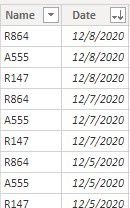
2. Then we need to add the value column.
Value =
CALCULATE(SUM('Table'[Value]),FILTER('Table','Table'[Date]='Result table'[Date] && 'Table'[Name]= 'Result table'[Name]))
3. At last we can create the result column.
Column =
VAR _date =
IF (
ISBLANK ( 'Result table'[Value] ),
MAXX (
FILTER (
'Result table',
'Result table'[Date] < EARLIER ( 'Result table'[Date] )
&& 'Result table'[Value] <> BLANK ()
&& 'Result table'[Name] = EARLIER ( 'Result table'[Name] )
),
'Result table'[Date]
),
'Result table'[Date]
)
RETURN
IF (
ISBLANK ( 'Result table'[Value] ),
CALCULATE (
SUM ( 'Result table'[Value] ),
FILTER (
'Result table',
'Result table'[Date] = _date
&& 'Result table'[Name] = EARLIER ( 'Result table'[Name] )
)
),
CALCULATE ( SUM ( 'Result table'[Value] ) )
)
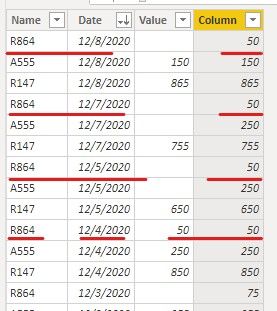
If it doesn’t meet your requirement, could you please show the exact expected result based on the table that you have shared?
Best regards,
Community Support Team _ zhenbw
If this post helps, then please consider Accept it as the solution to help the other members find it more quickly.
BTW, pbix as attached.
Hi @EdJ ,
We can create a new table and two new columns to meet your requirement.
1. Create a new table that contains whole date and name.
Result table =
CROSSJOIN(
VALUES('Table'[Name]),
VALUES('Table'[Date]))
2. Then we need to add the value column.
Value =
CALCULATE(SUM('Table'[Value]),FILTER('Table','Table'[Date]='Result table'[Date] && 'Table'[Name]= 'Result table'[Name]))
3. At last we can create the result column.
Column =
VAR _date =
IF (
ISBLANK ( 'Result table'[Value] ),
MAXX (
FILTER (
'Result table',
'Result table'[Date] < EARLIER ( 'Result table'[Date] )
&& 'Result table'[Value] <> BLANK ()
&& 'Result table'[Name] = EARLIER ( 'Result table'[Name] )
),
'Result table'[Date]
),
'Result table'[Date]
)
RETURN
IF (
ISBLANK ( 'Result table'[Value] ),
CALCULATE (
SUM ( 'Result table'[Value] ),
FILTER (
'Result table',
'Result table'[Date] = _date
&& 'Result table'[Name] = EARLIER ( 'Result table'[Name] )
)
),
CALCULATE ( SUM ( 'Result table'[Value] ) )
)
If it doesn’t meet your requirement, could you please show the exact expected result based on the table that you have shared?
Best regards,
Community Support Team _ zhenbw
If this post helps, then please consider Accept it as the solution to help the other members find it more quickly.
BTW, pbix as attached.
Hi @EdJ
This can be best done in Power Query
Can you paste the current table in text-tabular format here, instead of a screen cap, so that the contents can be copied easily?
Please mark the question solved when done and consider giving a thumbs up if posts are helpful.
Contact me privately for support with any larger-scale BI needs, tutoring, etc.
Cheers
The Power BI Data Visualization World Championships is back! Get ahead of the game and start preparing now!
| User | Count |
|---|---|
| 40 | |
| 35 | |
| 34 | |
| 31 | |
| 28 |
| User | Count |
|---|---|
| 137 | |
| 102 | |
| 71 | |
| 67 | |
| 65 |