This time we’re going bigger than ever. Fabric, Power BI, SQL, AI and more. We're covering it all. You won't want to miss it.
Learn moreDid you hear? There's a new SQL AI Developer certification (DP-800). Start preparing now and be one of the first to get certified. Register now
Whats the best way to filter a visual to data from only the current month. Would it be to create a measure filtering on latest month or is there an easier way?
Proud to be a Super User!
Solved! Go to Solution.
Hi @vanessafvg,
You can simply to create a calculated table to filter data with today function, then use this new table as the source of visual.
Current Month = CALCULATETABLE(DateTable,FILTER(ALL(DateTable),FORMAT([Date],"mm yyyy")=FORMAT(TODAY(),"mm yyyy")))
Notice: original datetable contains date from 2015 to 2017, after above steps, it only contains current month data.
Regards,
Xiaoxin Sheng
Hi @vanessafvg,
You can simply to create a calculated table to filter data with today function, then use this new table as the source of visual.
Current Month = CALCULATETABLE(DateTable,FILTER(ALL(DateTable),FORMAT([Date],"mm yyyy")=FORMAT(TODAY(),"mm yyyy")))
Notice: original datetable contains date from 2015 to 2017, after above steps, it only contains current month data.
Regards,
Xiaoxin Sheng
Hi tried the formula but got this error: "The expression refers to multiple columns. Multiple columns cannot be converted to a scalar value."
Here's my formula: Current Month = CALCULATETABLE(hd_backorders, FILTER(ALL(hd_backorders), FORMAT(hd_backorders[hd_estfulfillmentdate], "mm yyyy") = FORMAT(TODAY(), "mm yyyy")))
Hi everyone.
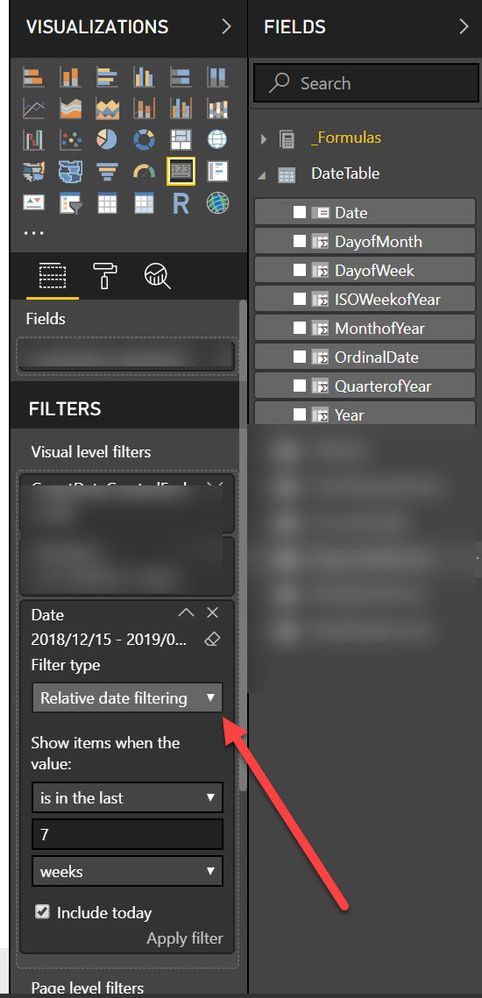
This functionality hasn't always been there, but if you have a proper formatted date column or better a dedicated date table, you can simply use the relative date filtering. See below:
Relative Date Filtering Power BI
Create a calculated column on your date table to identify current month and past month.
Check out the April 2026 Power BI update to learn about new features.
Sign up to receive a private message when registration opens and key events begin.
If you have recently started exploring Fabric, we'd love to hear how it's going. Your feedback can help with product improvements.
| User | Count |
|---|---|
| 34 | |
| 31 | |
| 25 | |
| 20 | |
| 16 |
| User | Count |
|---|---|
| 61 | |
| 49 | |
| 28 | |
| 23 | |
| 23 |