Join us at FabCon Atlanta from March 16 - 20, 2026, for the ultimate Fabric, Power BI, AI and SQL community-led event. Save $200 with code FABCOMM.
Register now!The Power BI Data Visualization World Championships is back! Get ahead of the game and start preparing now! Learn more
Whats the best way to filter a visual to data from only the current month. Would it be to create a measure filtering on latest month or is there an easier way?
Proud to be a Super User!
Solved! Go to Solution.
Hi @vanessafvg,
You can simply to create a calculated table to filter data with today function, then use this new table as the source of visual.
Current Month = CALCULATETABLE(DateTable,FILTER(ALL(DateTable),FORMAT([Date],"mm yyyy")=FORMAT(TODAY(),"mm yyyy")))
Notice: original datetable contains date from 2015 to 2017, after above steps, it only contains current month data.
Regards,
Xiaoxin Sheng
Hi @vanessafvg,
You can simply to create a calculated table to filter data with today function, then use this new table as the source of visual.
Current Month = CALCULATETABLE(DateTable,FILTER(ALL(DateTable),FORMAT([Date],"mm yyyy")=FORMAT(TODAY(),"mm yyyy")))
Notice: original datetable contains date from 2015 to 2017, after above steps, it only contains current month data.
Regards,
Xiaoxin Sheng
Hi tried the formula but got this error: "The expression refers to multiple columns. Multiple columns cannot be converted to a scalar value."
Here's my formula: Current Month = CALCULATETABLE(hd_backorders, FILTER(ALL(hd_backorders), FORMAT(hd_backorders[hd_estfulfillmentdate], "mm yyyy") = FORMAT(TODAY(), "mm yyyy")))
Hi everyone.
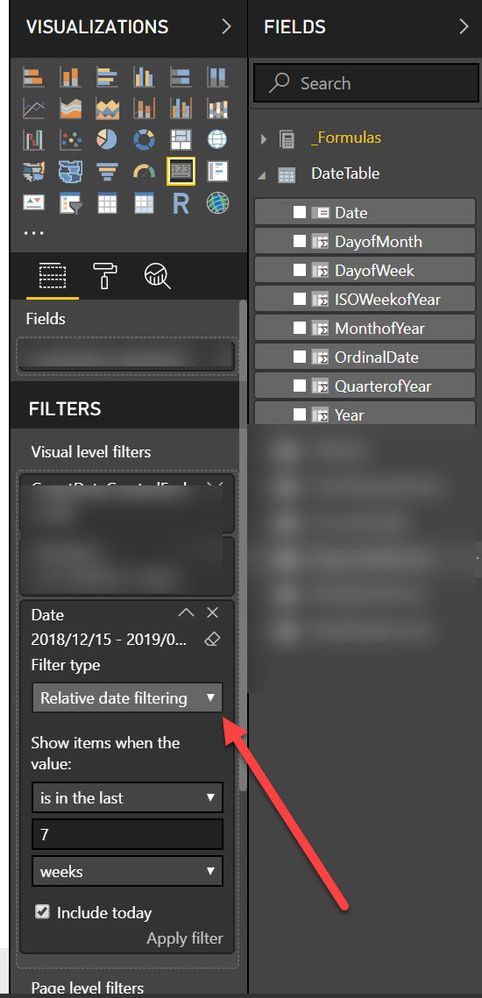
This functionality hasn't always been there, but if you have a proper formatted date column or better a dedicated date table, you can simply use the relative date filtering. See below:
Relative Date Filtering Power BI
Create a calculated column on your date table to identify current month and past month.
The Power BI Data Visualization World Championships is back! Get ahead of the game and start preparing now!
| User | Count |
|---|---|
| 46 | |
| 42 | |
| 34 | |
| 31 | |
| 21 |
| User | Count |
|---|---|
| 143 | |
| 125 | |
| 100 | |
| 81 | |
| 63 |