Don't miss your chance to take the Fabric Data Engineer (DP-600) exam for FREE! Find out how by attending the DP-600 session on April 23rd (pacific time), live or on-demand.
Learn moreNext up in the FabCon + SQLCon recap series: The roadmap for Microsoft SQL and Maximizing Developer experiences in Fabric. All sessions are available on-demand after the live show. Register now
Hello,
I have the following issue: i am using the desktop version and connecting to a sybase database.
In the database the date values are stored as text fields like: '20171003'
I convert this value to date values.
This value should return in dutch culture 03-10-2017 for 3 october 2017.
This works well in the desktop version but after publishing the report and refreshing it by the on premis gateway the datevalues are shown incorrect. I get the result 10-03-2017 instead.
I hope someone has a sollution.
Thanx
@Arnoh wrote:
Hello,
I have the following issue: i am using the desktop version and connecting to a sybase database.
In the database the date values are stored as text fields like: '20171003'
I convert this value to date values.
This value should return in dutch culture 03-10-2017 for 3 october 2017.
This works well in the desktop version but after publishing the report and refreshing it by the on premis gateway the datevalues are shown incorrect. I get the result 10-03-2017 instead.
I hope someone has a sollution.
Thanx
Have you format the date in Power BI desktop? I'm not able to reproduce that issue.
Hi thanx for your reaction,
Yes i formated the date in the desktop.
I have some screen shots addes.
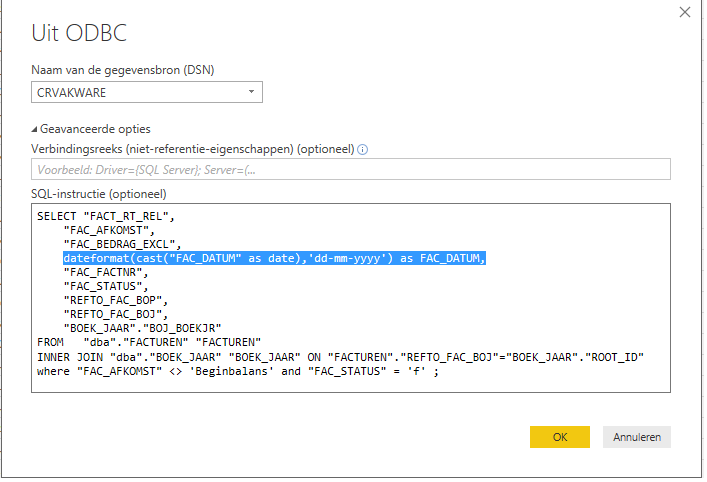
the sql script for the sybase database
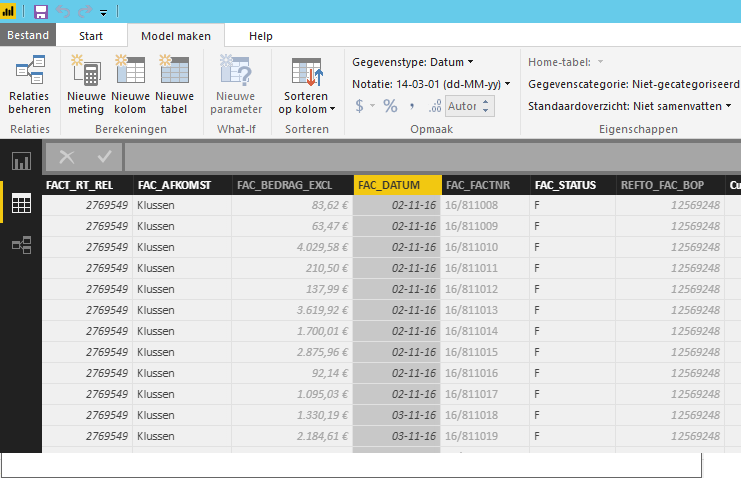
the date format
the result after a refreshing with on premis gateway. in te first date colum the day and month are for some records changed
In the snapshot, I see FAC_DATUM shows as the expected "DD-MM-YY" which is different from the description in your original post.
In the last snapshot you see in the kolom factuur datum dates with value 10-02-17.
In the sybase database these value is stored as ‘20171002’ as text.
In the Powerbi Desktop the date returns as 02-10-17 which is should be (dd-mm-yy).
After publishing the values seems to be ok and are also shown as 02-10-17.
When the data is refreshed the values show 10-02-17.
Only dates where month an day are able to switch are shown incorrect.
So date 23-02-2017 (23 february 2017) will go correct after refreshing.
If you have recently started exploring Fabric, we'd love to hear how it's going. Your feedback can help with product improvements.
A new Power BI DataViz World Championship is coming this June! Don't miss out on submitting your entry.
| User | Count |
|---|---|
| 45 | |
| 43 | |
| 38 | |
| 19 | |
| 15 |
| User | Count |
|---|---|
| 67 | |
| 66 | |
| 31 | |
| 28 | |
| 24 |