Don't miss your chance to take the Fabric Data Engineer (DP-600) exam for FREE! Find out how by watching the DP-600 session on-demand now through April 28th.
Learn moreJoin the FabCon + SQLCon recap series. Up next: Power BI, Real-Time Intelligence, IQ and AI, and Data Factory take center stage. All sessions are available on-demand after the live show. Register now
Hello,
please, I need your useful ideas in how to preview a report which its value column have multiple formats. I ask that's the best data modeling to be able getting visual reports.
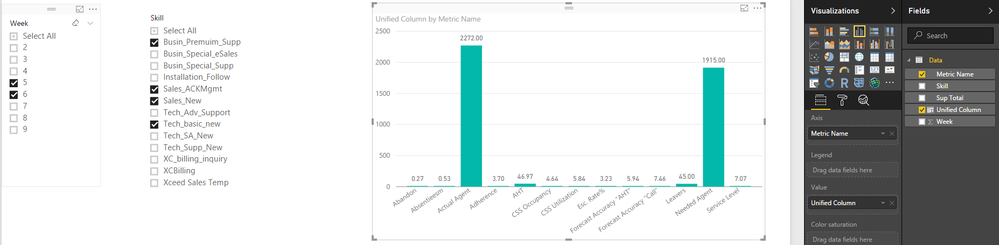
in recap: I ask if can I use the [Metric Name] column in X-Axis then filter by [Week] or [Skill], or another preview that could show me the value by [Metric] or the value by [Skill]. or get a complete insight which could measure the [metric] by [Skill] and vs
thanks a lot,
Hi @AAbdelkader,
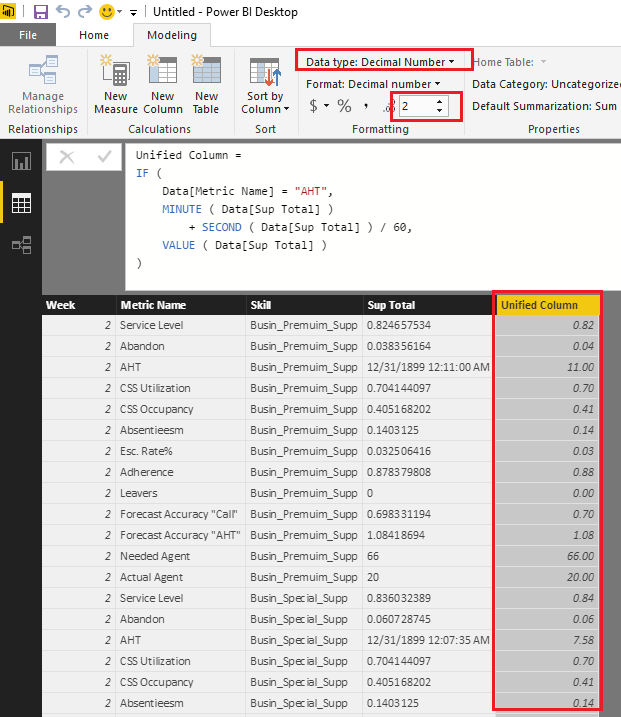
From my point of view, I don't think it is a good practice to put different formats data into a single column. So I would suggest you unify the formats for the column to Decimal Number type in this scenario. The percentage(80%) and integer(66) type data is easy to be changed to decimal number type. For the Time(0:11:00) type data, you can convert it to seconds or minutes first, then change it to decimal number.![]()
The formula below to create new calculate column to unify the formats is for your reference.
Unified Column =
IF (
Data[Metric Name] = "AHT",
MINUTE ( Data[Sup Total] )
+ SECOND ( Data[Sup Total] ) / 60,
VALUE ( Data[Sup Total] )
)
Regards
Check out the April 2026 Power BI update to learn about new features.
If you have recently started exploring Fabric, we'd love to hear how it's going. Your feedback can help with product improvements.
A new Power BI DataViz World Championship is coming this June! Don't miss out on submitting your entry.
| User | Count |
|---|---|
| 43 | |
| 37 | |
| 35 | |
| 22 | |
| 15 |
| User | Count |
|---|---|
| 65 | |
| 58 | |
| 29 | |
| 27 | |
| 25 |