Don't miss your chance to take the Fabric Data Engineer (DP-600) exam for FREE! Find out how by attending the DP-600 session on April 23rd (pacific time), live or on-demand.
Learn moreNext up in the FabCon + SQLCon recap series: The roadmap for Microsoft SQL and Maximizing Developer experiences in Fabric. All sessions are available on-demand after the live show. Register now
Hello,
please, I need your useful ideas in how to preview a report which its value column have multiple formats. I ask that's the best data modeling to be able getting visual reports.
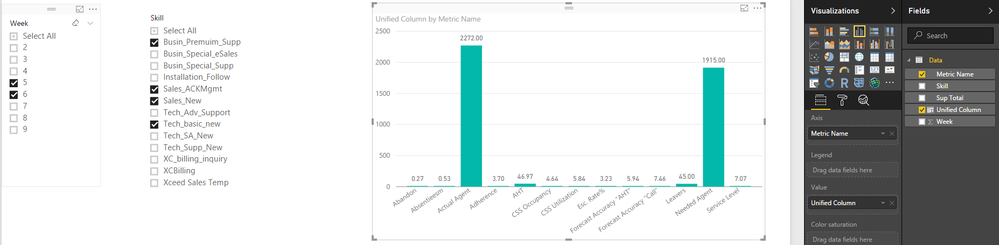
in recap: I ask if can I use the [Metric Name] column in X-Axis then filter by [Week] or [Skill], or another preview that could show me the value by [Metric] or the value by [Skill]. or get a complete insight which could measure the [metric] by [Skill] and vs
thanks a lot,
Hi @AAbdelkader,
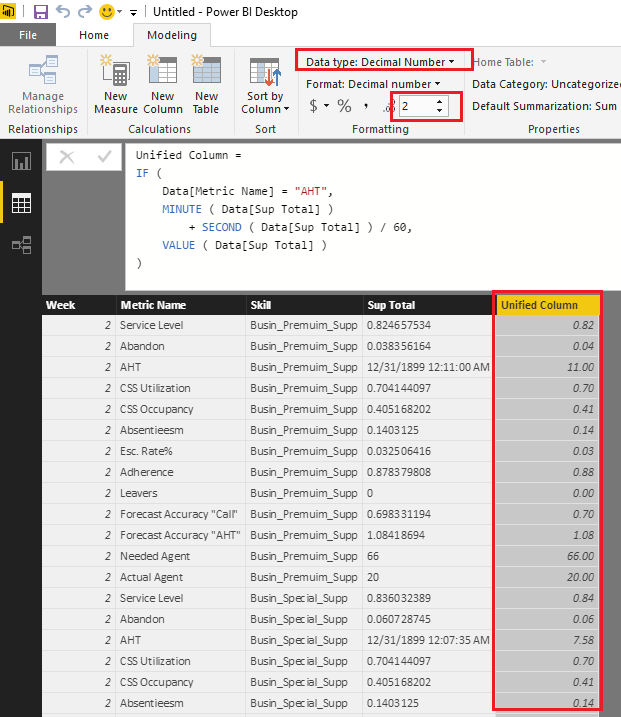
From my point of view, I don't think it is a good practice to put different formats data into a single column. So I would suggest you unify the formats for the column to Decimal Number type in this scenario. The percentage(80%) and integer(66) type data is easy to be changed to decimal number type. For the Time(0:11:00) type data, you can convert it to seconds or minutes first, then change it to decimal number.![]()
The formula below to create new calculate column to unify the formats is for your reference.
Unified Column =
IF (
Data[Metric Name] = "AHT",
MINUTE ( Data[Sup Total] )
+ SECOND ( Data[Sup Total] ) / 60,
VALUE ( Data[Sup Total] )
)
Regards
If you have recently started exploring Fabric, we'd love to hear how it's going. Your feedback can help with product improvements.
A new Power BI DataViz World Championship is coming this June! Don't miss out on submitting your entry.
Experience the highlights from FabCon & SQLCon, available live and on-demand starting April 14th.
| User | Count |
|---|---|
| 48 | |
| 40 | |
| 40 | |
| 20 | |
| 16 |
| User | Count |
|---|---|
| 70 | |
| 67 | |
| 32 | |
| 27 | |
| 26 |