This is best Fabric, Power BI, SQL and AI community event. How do we know? The last event sold out! Save €200 with code FABCMTY200.
Register nowA new Data Days event is coming soon! This time we’re going bigger than ever. Fabric, Power BI, SQL, AI and more. Don't miss out.
Hi All,
I need to count the number of closed tickets in a table between 2 dates.
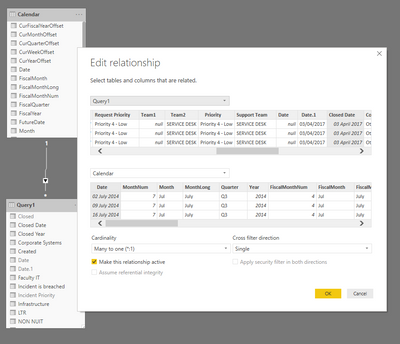
I have a date table connected to my data table
To get a closed date I had to use an if statement:
Solved! Go to Solution.
Hi @Anonymous ,
To create a measure as below.
Measure =
CALCULATE (
COUNTROWS ( Query1 ),
FILTER (
Query1,
Query1[Closed Date] >= DATE ( 2018, 08, 01 )
&& Query1[Closed Date] <= DATE ( 2019, 07, 31 )
)
)
If it doesn't meet your requirement, kindly share your sample data and excepted result to me if you don't have any Confidential Information. Please upload your files to One Drive and share the link here.
Hi @Anonymous ,
To create a measure as below.
Measure =
CALCULATE (
COUNTROWS ( Query1 ),
FILTER (
Query1,
Query1[Closed Date] >= DATE ( 2018, 08, 01 )
&& Query1[Closed Date] <= DATE ( 2019, 07, 31 )
)
)
If it doesn't meet your requirement, kindly share your sample data and excepted result to me if you don't have any Confidential Information. Please upload your files to One Drive and share the link here.
Worked perfectly, thanks
Hi @Anonymous
Try this as a measure:
Closed Tickets =
CALCULATE (
COUNTROWS ( Query1 ),
DATESBETWEEN (
Calendar,
DATE ( 2018, 08, 01 ),
DATE ( 2019, 07, 31 )
)
)
You can, of course, make this a dynamic measure by replacing the hardcoded dates in the DATESBETWEEN function.
Hope it helps.
Best regards,
Martyn
Check out the May 2026 Power BI update to learn about new features.
Sign up to receive a private message when registration opens and key events begin.
If you have recently started exploring Fabric, we'd love to hear how it's going. Your feedback can help with product improvements.
| User | Count |
|---|---|
| 31 | |
| 26 | |
| 23 | |
| 22 | |
| 15 |
| User | Count |
|---|---|
| 63 | |
| 45 | |
| 28 | |
| 24 | |
| 22 |