Don't miss your chance to take exam DP-600 or DP-700 on us!
Request nowLearn from the best! Meet the four finalists headed to the FINALS of the Power BI Dataviz World Championships! Register now
Hello community.
I have a table with one field that is number of days in it (decimal). I want to add this to a calendar date (01/01/1970). I have researched all options and am doing something wrong as each effort results in an error.
As close as I have been able to get is
[T1] = 17905.72715 This is the number of days since 01/01/1970
Date.AddDays(DateTime.FromText("1970-01-01"),[T1])
The error returned is "Expression Error: The number is out of range of a 32 bit integer value. Details: 17905.72715
Thanks for advice.
Regards
Jim B
Solved! Go to Solution.
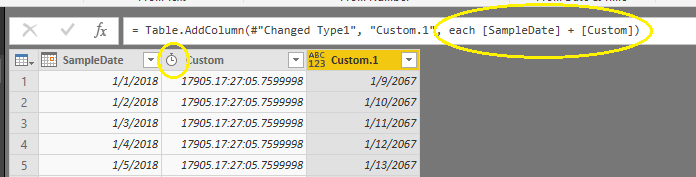
Try changing [T1] to Duration and then simply use + to add DateTime.FromText("1970-01-01") and [T1].
Try changing [T1] to a Whole Number. DateAdd expects a whole number, and not a decimal.
Is there another function that will accept decimal values? The resulting value would represent intraday prices and eliminating the decimal portion would result in an inaccurate value.
Try changing [T1] to Duration and then simply use + to add DateTime.FromText("1970-01-01") and [T1].
Thanks very much. It works.
I just have to adjust for time zone and I have the total solution.
Jim B
Share feedback directly with Fabric product managers, participate in targeted research studies and influence the Fabric roadmap.
Check out the February 2026 Power BI update to learn about new features.
| User | Count |
|---|---|
| 51 | |
| 40 | |
| 37 | |
| 14 | |
| 14 |
| User | Count |
|---|---|
| 84 | |
| 69 | |
| 38 | |
| 29 | |
| 27 |