Join us at FabCon Atlanta from March 16 - 20, 2026, for the ultimate Fabric, Power BI, AI and SQL community-led event. Save $200 with code FABCOMM.
Register now!The Power BI Data Visualization World Championships is back! Get ahead of the game and start preparing now! Learn more
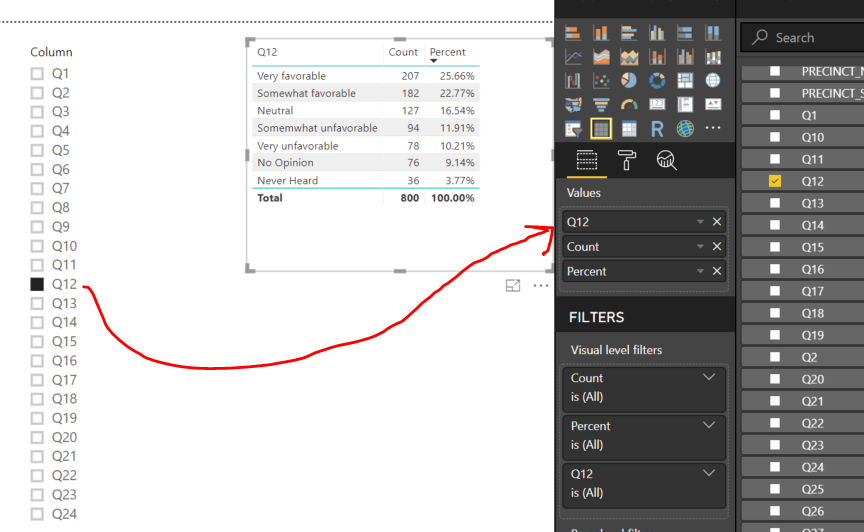
1.) I would like to have a slicer that lists all the column names in a table
2.) When I select a colum name value in the slicer, I want to dynamically display the Count and Percent of Total for the selected column in a Power BI visual (a table for example).
Is this possible?
Solved! Go to Solution.
Thanks so much! That did the trick, I had no idea that was an option.
Mike
Hi hawb,
In Edit Queries, click columns from Q1 to Q24, click Transform-> Unpivot Columns, this will transform all column names to values in a new column, then create a slicer based on that new column.
Regards,
Jimmy Tao
Jimmy,
So your solution works great for generating the source for a filter list. But, ultimately what I want to do is select a value from the slicer, and have it display the values & counts for the selected field. For instance, if I select Q12 from the filter, I want to see the unique values in the Q12 data field as well as the counts for each unique value. If I select Q13, the I want to see unique values and counts for Q13, etc. But, in this case, the slicer only feeds the field name to the table. If I summarize (i.e. Count) it will simply show 1 row with the total number of records in the dataset instead of all the unique values in that data field. Make sense?
Am I missing something? Is it possible?
Thanks!
Ugg. Nevermind. I didnt realize unpivoting produced 2 columns including a value column. Using the value column provides what I need.
Thanks so much! That did the trick, I had no idea that was an option.
Mike
The Power BI Data Visualization World Championships is back! Get ahead of the game and start preparing now!
| User | Count |
|---|---|
| 53 | |
| 42 | |
| 34 | |
| 33 | |
| 21 |
| User | Count |
|---|---|
| 143 | |
| 125 | |
| 100 | |
| 80 | |
| 59 |