Get certified for free when you join Fabric Data Days 2026 and dive into Fabric, Power BI, SQL, AI, and other essential data skills.
Join nowTry your skills in the Power BI Dataviz World Championship! Round one ends June 26. Join now
Hello community.
I have a table with one field that is number of days in it (decimal). I want to add this to a calendar date (01/01/1970). I have researched all options and am doing something wrong as each effort results in an error.
As close as I have been able to get is
[T1] = 17905.72715 This is the number of days since 01/01/1970
Date.AddDays(DateTime.FromText("1970-01-01"),[T1])
The error returned is "Expression Error: The number is out of range of a 32 bit integer value. Details: 17905.72715
Thanks for advice.
Regards
Jim B
Solved! Go to Solution.
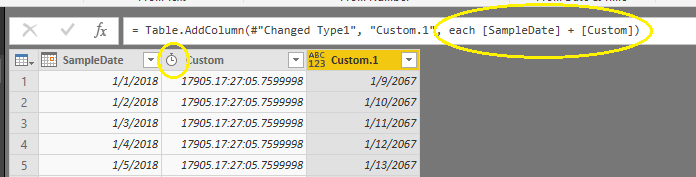
Try changing [T1] to Duration and then simply use + to add DateTime.FromText("1970-01-01") and [T1].
Try changing [T1] to a Whole Number. DateAdd expects a whole number, and not a decimal.
Is there another function that will accept decimal values? The resulting value would represent intraday prices and eliminating the decimal portion would result in an inaccurate value.
Try changing [T1] to Duration and then simply use + to add DateTime.FromText("1970-01-01") and [T1].
Thanks very much. It works.
I just have to adjust for time zone and I have the total solution.
Jim B
Don't miss out on Data Days, June 15 through August 7. Learn Fabric, Power BI, SQL, AI and more.
Check out the May 2026 Power BI update to learn about new features.
| User | Count |
|---|---|
| 22 | |
| 22 | |
| 21 | |
| 20 | |
| 12 |
| User | Count |
|---|---|
| 58 | |
| 55 | |
| 42 | |
| 36 | |
| 35 |