
Join us at FabCon Atlanta from March 16 - 20, 2026, for the ultimate Fabric, Power BI, AI and SQL community-led event. Save $200 with code FABCOMM.
Register now!The Power BI Data Visualization World Championships is back! Get ahead of the game and start preparing now! Learn more
I am trying to get Power BI to calculate the weighted average Gross profit % (GP $/Sales$) by customer. I am doing a customer analsysis and i currently have my data setup to show the top 10 customers by brand. I am analyzing lbs sold and GP $ by customer, but i would also like to have a line chart in my data showing the weight avg GP % by month, by year that will update when i slice by customer. My data currently has the GP $ and Sales $ on every order that we received. I set up a column to calculate the GP% and i am currently able to have my line chart show the Avg GP% but its not the WEIGHTED Avg GP%. Could anyone help me with how I would set this up in my Power BI data? I just started using Power Bi so I appologize for the question. I appreciate any help someone can give me! Thank you!
@Nacujo wrote:
I am trying to get Power BI to calculate the weighted average Gross profit % (GP $/Sales$) by customer. I am doing a customer analsysis and i currently have my data setup to show the top 10 customers by brand. I am analyzing lbs sold and GP $ by customer, but i would also like to have a line chart in my data showing the weight avg GP % by month, by year that will update when i slice by customer. My data currently has the GP $ and Sales $ on every order that we received. I set up a column to calculate the GP% and i am currently able to have my line chart show the Avg GP% but its not the WEIGHTED Avg GP%. Could anyone help me with how I would set this up in my Power BI data? I just started using Power Bi so I appologize for the question. I appreciate any help someone can give me! Thank you!
I don't think you have to create a column, instead you can create a measure. If you'd like further suggestion, please post some sample data and expected output.
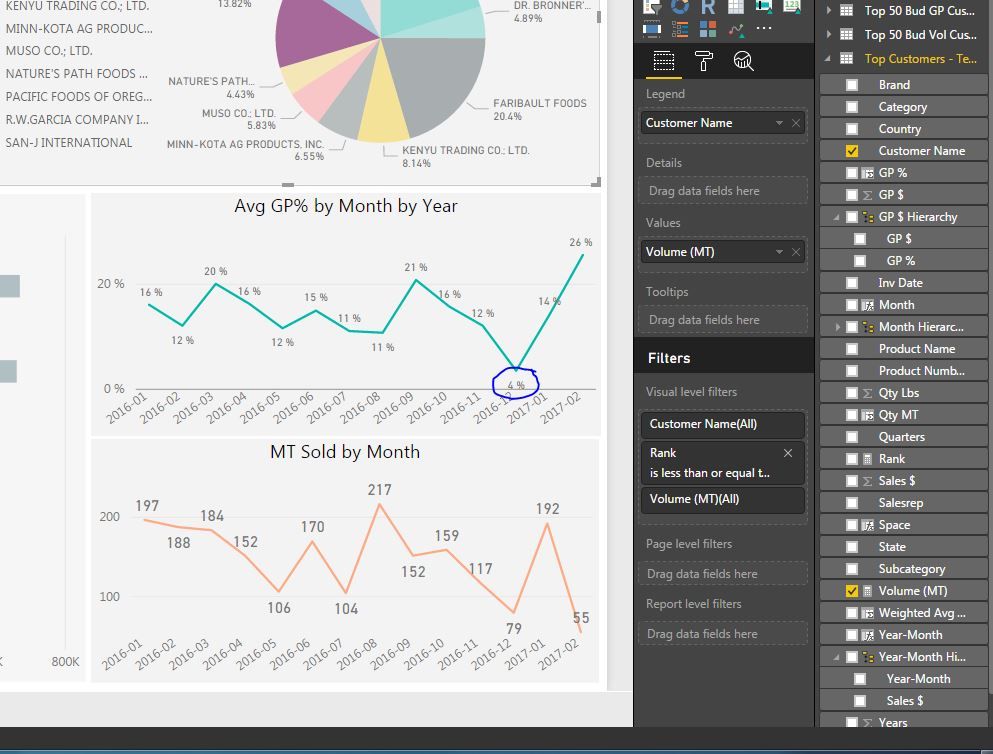
@Eric_Zhang - On my top 10 customers for each brand, i want my measure to look at what the total gross profit by month for the customer that is selected divided by the total sales $. The data for my Power BI dashboard is taken from an excel pivot table. Below is a picture of some sales data for one of my top customers Pacific Foods in December 2016. Currently, Power BI is taking an avg GP % of each sale and averaging those GP % against each other, so it shows for this customer in December 2016, that we had a GP % of 4%. However, if you add up all the GP for the month/Sales $, the GP % for the month of December 2016 for Pacific Foods SHOULD be -2%. I hope this is enough info to give me an idea how to set this up.
This is how it looks in Power BI
Example of data which is pulled into Power BI
The Power BI Data Visualization World Championships is back! Get ahead of the game and start preparing now!
| User | Count |
|---|---|
| 38 | |
| 36 | |
| 33 | |
| 32 | |
| 29 |
| User | Count |
|---|---|
| 129 | |
| 88 | |
| 79 | |
| 68 | |
| 63 |