This is best Fabric, Power BI, SQL and AI community event. How do we know? The last event sold out! Save €200 with code FABCMTY200.
Register nowJuly 28 - August 9 | Final Round of the Power BI Dataviz World Championships. This is your chance. Learn more
Hi all,
How can I achieve the following week number results?:
| Day | Date | ISO8601 | Special |
| Thursday | 31.12.2020 | 53 | 53 |
| Friday | 01.01.2021 | 53 | 1 |
| Saturday | 02.01.2021 | 53 | 1 |
| Sunday | 03.01.2021 | 53 | 1 |
| Monday | 04.01.2021 | 1 | 1 |
| Tuesday | 05.01.2021 | 1 | 1 |
| Wednesday | 06.01.2021 | 1 | 1 |
| Thursday | 07.01.2021 | 1 | 1 |
| Friday | 08.01.2021 | 1 | 1 |
| Saturday | 09.01.2021 | 1 | 1 |
| Sunday | 10.01.2021 | 1 | 1 |
| Monday | 11.01.2021 | 2 | 2 |
Looking forward to your answers.
Thanks.
Solved! Go to Solution.
Hi @Anonymous ,
You can create the calculated column like this:
ISO8601 = WEEKNUM('Table'[Date],21)
Please refer the [ISO] column in my sample file from the previous post.
Best Regards,
Community Support Team _ Yingjie Li
If this post helps, then please consider Accept it as the solution to help the other members find it more quickly.
Hi @Anonymous ,
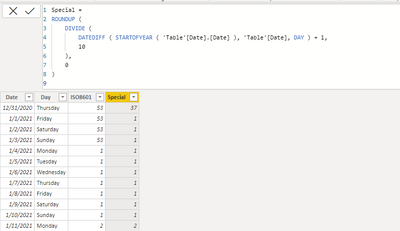
Based on your description, seems like you want to define 10 days as a week for each year, you can create a calculated column like this:
Special =
ROUNDUP (
DIVIDE (
DATEDIFF ( STARTOFYEAR ( 'Table'[Date].[Date] ), 'Table'[Date], DAY ) + 1,
10
),
0
)
Attached a sample file in the below, hopes to help you.
Best Regards,
Community Support Team _ Yingjie Li
If this post helps, then please consider Accept it as the solution to help the other members find it more quickly.
Hello,
Thank you for that.
How can I get the week numbers to calculate based on the ISO8601?:
| Day | Date | Week Number ISO8601 |
| Thursday | 31.12.2020 | 53 |
| Friday | 01.01.2021 | 53 |
| Saturday | 02.01.2021 | 53 |
| Sunday | 03.01.2021 | 53 |
| Monday | 04.01.2021 | 1 |
| Tuesday | 05.01.2021 | 1 |
| Wednesday | 06.01.2021 | 1 |
| Thursday | 07.01.2021 | 1 |
| Friday | 08.01.2021 | 1 |
| Saturday | 09.01.2021 | 1 |
| Sunday | 10.01.2021 | 1 |
| Monday | 11.01.2021 | 2 |
Looking forward to hearing back from you.
Best regards.
Hi @Anonymous ,
You can create the calculated column like this:
ISO8601 = WEEKNUM('Table'[Date],21)
Please refer the [ISO] column in my sample file from the previous post.
Best Regards,
Community Support Team _ Yingjie Li
If this post helps, then please consider Accept it as the solution to help the other members find it more quickly.
@Anonymous , there is an issue reported for that.
For 2021, try like new week column like
Week Number =
if(Year([date] = 2021 && WEEKNUM([Date],2) >=2, WEEKNUM([Date],2) -1,WEEKNUM([Date],2))
Hi Amit,
And how would it work the previous and following years?
Many thanks.
Join us in Barcelona for FabCon and SQLCon, the Fabric, Power BI, SQL, and AI community event. Save €200 with code FABCMTY200.
If you love stickers, then you will definitely want to check out our community sticker challenge, Barcelona edition!
Check out the July 2026 Power BI update to learn about new features.
| User | Count |
|---|---|
| 25 | |
| 23 | |
| 22 | |
| 17 | |
| 14 |
| User | Count |
|---|---|
| 25 | |
| 24 | |
| 20 | |
| 19 | |
| 19 |