Join us in Barcelona for FabCon and SQLCon, September 28 - October 1, 2026.
This is best Fabric, Power BI, SQL and AI community event. How do we know? The last event sold out! Save €200 with code FABCMTY200.
Register now- Power BI forums
- Get Help with Power BI
- Desktop
- Service
- Report Server
- Power Query
- Mobile Apps
- Developer
- DAX Commands and Tips
- Custom Visuals Development Discussion
- Health and Life Sciences
- Power BI Spanish forums
- Translated Spanish Desktop
- Training and Consulting
- Instructor Led Training
- Dashboard in a Day for Women, by Women
- Galleries
- Data Stories Gallery
- Themes Gallery
- Contests Gallery
- QuickViz Gallery
- Quick Measures Gallery
- Visual Calculations Gallery
- Fabric Apps Gallery
- Notebook Gallery
- Translytical Task Flow Gallery
- TMDL Gallery
- R Script Showcase
- Webinars and Video Gallery
- Ideas
- Custom Visuals Ideas (read-only)
- Issues
- Issues
- Events
- Upcoming Events
The Fabric community is now in read-only for platform upgrade. Learn more
- Power BI forums
- Forums
- Get Help with Power BI
- Desktop
- Re: Week number
- Subscribe to RSS Feed
- Mark Topic as New
- Mark Topic as Read
- Float this Topic for Current User
- Bookmark
- Subscribe
- Printer Friendly Page

- Mark as New
- Bookmark
- Subscribe
- Mute
- Subscribe to RSS Feed
- Permalink
Week number
Hi all,
How can I achieve the following week number results?:
| Day | Date | ISO8601 | Special |
| Thursday | 31.12.2020 | 53 | 53 |
| Friday | 01.01.2021 | 53 | 1 |
| Saturday | 02.01.2021 | 53 | 1 |
| Sunday | 03.01.2021 | 53 | 1 |
| Monday | 04.01.2021 | 1 | 1 |
| Tuesday | 05.01.2021 | 1 | 1 |
| Wednesday | 06.01.2021 | 1 | 1 |
| Thursday | 07.01.2021 | 1 | 1 |
| Friday | 08.01.2021 | 1 | 1 |
| Saturday | 09.01.2021 | 1 | 1 |
| Sunday | 10.01.2021 | 1 | 1 |
| Monday | 11.01.2021 | 2 | 2 |
Looking forward to your answers.
Thanks.
Solved! Go to Solution.


- Mark as New
- Bookmark
- Subscribe
- Mute
- Subscribe to RSS Feed
- Permalink
Hi @Anonymous ,
You can create the calculated column like this:
ISO8601 = WEEKNUM('Table'[Date],21)Please refer the [ISO] column in my sample file from the previous post.
Best Regards,
Community Support Team _ Yingjie Li
If this post helps, then please consider Accept it as the solution to help the other members find it more quickly.
- Mark as New
- Bookmark
- Subscribe
- Mute
- Subscribe to RSS Feed
- Permalink
Hi @Anonymous ,
Based on your description, seems like you want to define 10 days as a week for each year, you can create a calculated column like this:
Special =
ROUNDUP (
    DIVIDE (
        DATEDIFF ( STARTOFYEAR ( 'Table'[Date].[Date] ), 'Table'[Date], DAY ) + 1,
        10
    ),
    0
)
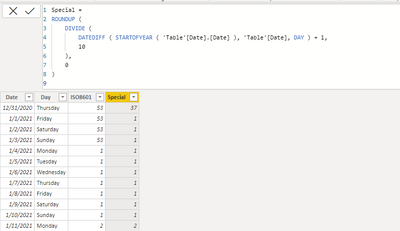
Attached a sample file in the below, hopes to help you.
Best Regards,
Community Support Team _ Yingjie Li
If this post helps, then please consider Accept it as the solution to help the other members find it more quickly.
- Mark as New
- Bookmark
- Subscribe
- Mute
- Subscribe to RSS Feed
- Permalink
Hello,
Thank you for that.
How can I get the week numbers to calculate based on the ISO8601?:
| Day | Date | Week Number ISO8601 |
| Thursday | 31.12.2020 | 53 |
| Friday | 01.01.2021 | 53 |
| Saturday | 02.01.2021 | 53 |
| Sunday | 03.01.2021 | 53 |
| Monday | 04.01.2021 | 1 |
| Tuesday | 05.01.2021 | 1 |
| Wednesday | 06.01.2021 | 1 |
| Thursday | 07.01.2021 | 1 |
| Friday | 08.01.2021 | 1 |
| Saturday | 09.01.2021 | 1 |
| Sunday | 10.01.2021 | 1 |
| Monday | 11.01.2021 | 2 |
Looking forward to hearing back from you.
Best regards.
- Mark as New
- Bookmark
- Subscribe
- Mute
- Subscribe to RSS Feed
- Permalink
Hi @Anonymous ,
You can create the calculated column like this:
ISO8601 = WEEKNUM('Table'[Date],21)Please refer the [ISO] column in my sample file from the previous post.
Best Regards,
Community Support Team _ Yingjie Li
If this post helps, then please consider Accept it as the solution to help the other members find it more quickly.


- Mark as New
- Bookmark
- Subscribe
- Mute
- Subscribe to RSS Feed
- Permalink
@Anonymous , there is an issue reported for that.
For 2021, try like new week column like
Week Number =
if(Year([date] = 2021 && WEEKNUM([Date],2) >=2, WEEKNUM([Date],2) -1,WEEKNUM([Date],2))
- Mark as New
- Bookmark
- Subscribe
- Mute
- Subscribe to RSS Feed
- Permalink
Hi Amit,
And how would it work the previous and following years?
Many thanks.
Helpful resources

FabCon & SQLCon – Barcelona 2026
Join us in Barcelona for FabCon and SQLCon, the Fabric, Power BI, SQL, and AI community event. Save €200 with code FABCMTY200.

Power BI DataViz World Championships - June 2026
A new Power BI DataViz World Championship is coming this June! Don't miss out on submitting your entry.

| User | Count |
|---|---|
| 23 | |
| 22 | |
| 14 | |
| 14 | |
| 13 |


| User | Count |
|---|---|
| 47 | |
| 39 | |
| 24 | |
| 20 | |
| 20 |


