This time we’re going bigger than ever. Fabric, Power BI, SQL, AI and more. We're covering it all. You won't want to miss it.
Learn moreLevel up your Power BI skills this month - build one visual each week and tell better stories with data! Get started
Hi all,
New to PowerBI - trying to recreate some charts I am use to in excel.
Its a property business - which has a list of tenants - with rent adding up to a total rent roll - across different sites
I want to bridge total rent roll at the end of one period (2017 in this example) to the next - end of 2018
The bridge segments - i would like to come from the 2nd table - split between new tenants starting, tenants leaving and tenants renewing
The first table:
| Property code | Date | Closing rent roll |
| 101 | 31/12/2017 | 1,000 |
| 101 | 31/12/2018 | 1,200 |
| 102 | 31/12/2017 | 2,000 |
| 102 | 31/12/2018 | 2,500 |
The 2nd table:
| Property code | Date | Net RR | Status |
| 101 | 31/03/2018 | 500 | New starters |
| 101 | 31/03/2018 | -500 | Leavers |
| 101 | 31/03/2018 | 200 | Renewals |
| 102 | 31/03/2018 | 500 | New starters |
| 102 | 31/03/2018 | -500 | Leavers |
| 102 | 31/03/2018 | 500 | Renewals |
As you can see the sum of the movements - equals the total movement in rent roll
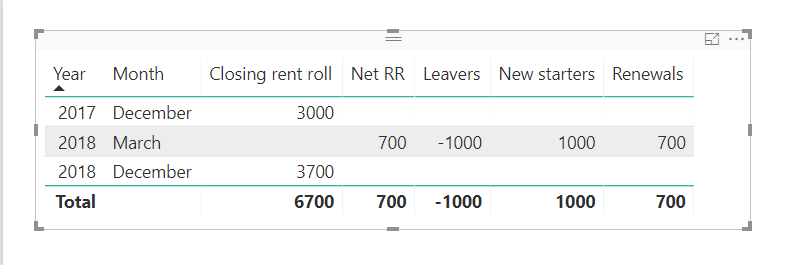
IN power BI - i have got as far as producing the table below
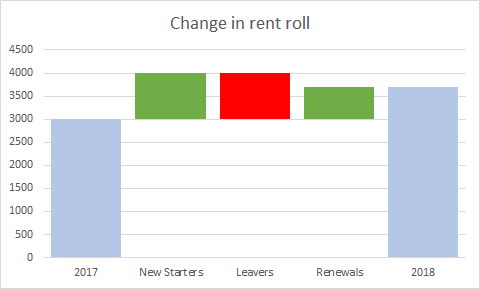
And I would like the graph to look like - something like the below
so its 3000 + 1000 new rev.- 1000 rev. + 700 incremental rev. from existing = 3700 rent roll
Any help would be greatly apprecaited
thanks,
Laurence
You may try using UNION Function to add a calculated table first.
Check out the April 2026 Power BI update to learn about new features.
Sign up to receive a private message when registration opens and key events begin.
If you have recently started exploring Fabric, we'd love to hear how it's going. Your feedback can help with product improvements.
| User | Count |
|---|---|
| 35 | |
| 32 | |
| 25 | |
| 22 | |
| 18 |
| User | Count |
|---|---|
| 67 | |
| 36 | |
| 32 | |
| 25 | |
| 23 |