This is best Fabric, Power BI, SQL and AI community event. How do we know? The last event sold out! Save €200 with code FABCMTY200.
Register nowA new Data Days event is coming soon! This time we’re going bigger than ever. Fabric, Power BI, SQL, AI and more. Don't miss out.
Hello everyone!
I have this data which contain date and time. Time an activity was closed and target time.
Currently, we still cannot use Time as Y-axis right?
But is there a way or could you suggest a visualization that I can use to show Time Closed vs Target Time where my shared axis or X-axis is the date?
Thank you!
Hi @Anonymous,
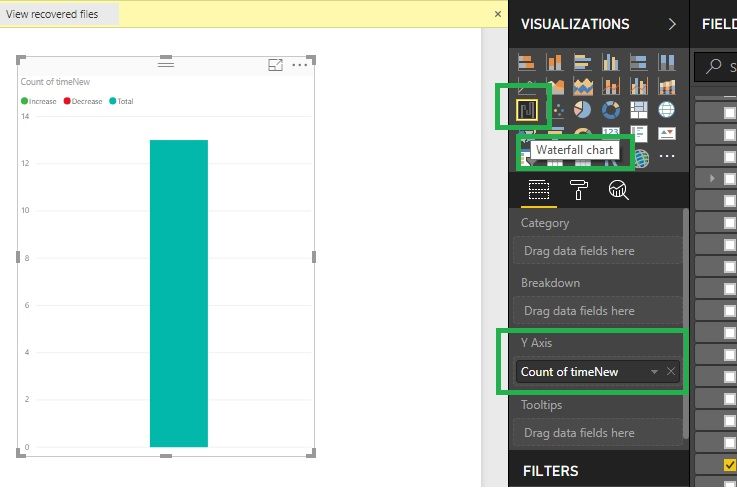
Waterfall chart will hep you to take Y-Axis, Please go through the below screenshot. Thanks.
Hi @Anonymous,
No, I haven't heard any plan about this feature.
In fact, current power bi visuals require at least one value filed that can be aggregated as axis field.
AFAIK, time and date type not support summarized, maybe you can try to convert to text type then use it on axis.
BTW, gantt visual may suitable for your requirement.
Regards,
Xiaoxin Sheng
Thank you @Anonymous. Yes, I considered using the Gantt visuals for time-related data.
Thank you!
Sign up to receive a private message when registration opens and key events begin.
If you have recently started exploring Fabric, we'd love to hear how it's going. Your feedback can help with product improvements.
| User | Count |
|---|---|
| 32 | |
| 26 | |
| 21 | |
| 20 | |
| 15 |
| User | Count |
|---|---|
| 65 | |
| 41 | |
| 28 | |
| 22 | |
| 22 |