Get certified for free when you join Fabric Data Days 2026 and dive into Fabric, Power BI, SQL, AI, and other essential data skills.
Join nowData Days is here! Join us now for 60+ days of learning, challenges, and connection. Learn more
Hello everyone!
I have this data which contain date and time. Time an activity was closed and target time.
Currently, we still cannot use Time as Y-axis right?
But is there a way or could you suggest a visualization that I can use to show Time Closed vs Target Time where my shared axis or X-axis is the date?
Thank you!
Hi @Anonymous,
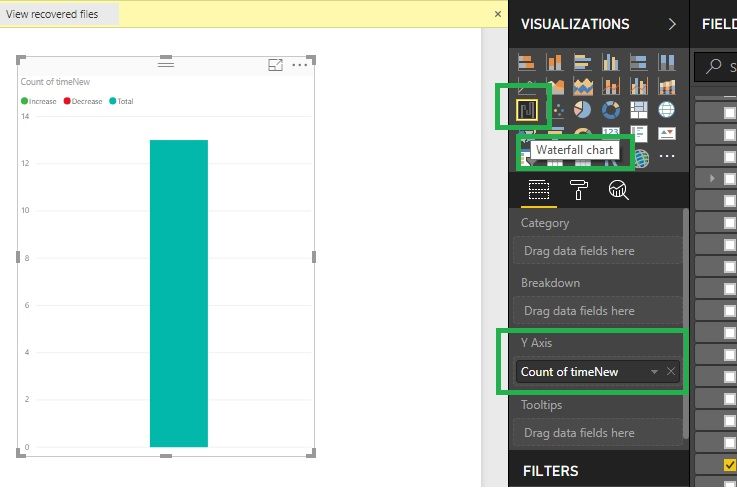
Waterfall chart will hep you to take Y-Axis, Please go through the below screenshot. Thanks.
Hi @Anonymous,
No, I haven't heard any plan about this feature.
In fact, current power bi visuals require at least one value filed that can be aggregated as axis field.
AFAIK, time and date type not support summarized, maybe you can try to convert to text type then use it on axis.
BTW, gantt visual may suitable for your requirement.
Regards,
Xiaoxin Sheng
Thank you @Anonymous. Yes, I considered using the Gantt visuals for time-related data.
Thank you!
Don't miss out on Data Days, June 15 through August 7. Learn Fabric, Power BI, SQL, AI and more.
Check out the May 2026 Power BI update to learn about new features.
| User | Count |
|---|---|
| 23 | |
| 23 | |
| 20 | |
| 18 | |
| 14 |
| User | Count |
|---|---|
| 58 | |
| 51 | |
| 41 | |
| 30 | |
| 24 |