Join us at FabCon Atlanta from March 16 - 20, 2026, for the ultimate Fabric, Power BI, AI and SQL community-led event. Save $200 with code FABCOMM.
Register now!Get Fabric certified for FREE! Don't miss your chance! Learn more
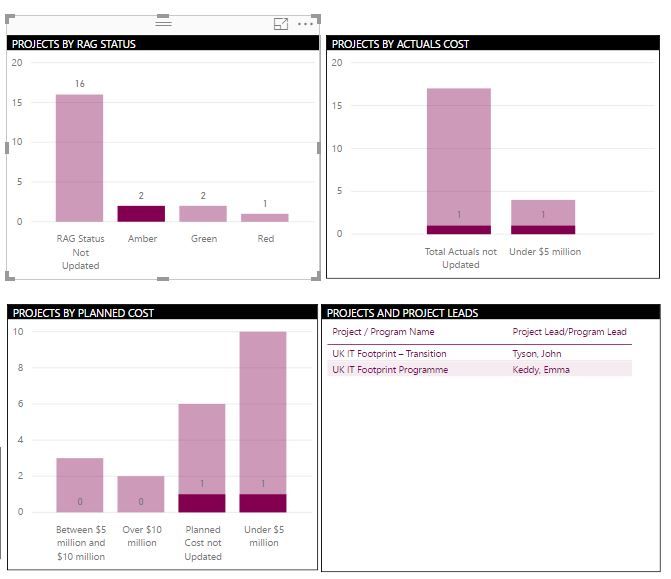
I need some help with building visual interactions on my dashboard. I have attached a snapshot of my dashboard here. what I am looking for is - When I click on the 'Amber' column in 'Projects by RAG status' visual, all the other visuals get filtered. Now, keeping the Projects by RAG Status filtered at 'Amber', I would like to filter down to the column 'Under $5 million' in the second visual titled 'Projects by Actual Cost'. Is this something that I can build into Power BI? All the data comes from a single table, in case that helps.
we can do this by 'Ctrl+click' on the bar instead of just clicking the bar
Hi @Anonymous,
I am not sure if it's possible, as far as I know if u activate the "Drilling filter others visuals" option you can filter all columns from the others visual.
https://docs.microsoft.com/en-us/power-bi/service-reports-visual-interactions
Thanks,
Ricardo
Share feedback directly with Fabric product managers, participate in targeted research studies and influence the Fabric roadmap.
Check out the January 2026 Power BI update to learn about new features.
| User | Count |
|---|---|
| 68 | |
| 59 | |
| 44 | |
| 20 | |
| 15 |
| User | Count |
|---|---|
| 104 | |
| 102 | |
| 37 | |
| 26 | |
| 26 |