Join us at FabCon Atlanta from March 16 - 20, 2026, for the ultimate Fabric, Power BI, AI and SQL community-led event. Save $200 with code FABCOMM.
Register now!The Power BI Data Visualization World Championships is back! Get ahead of the game and start preparing now! Learn more
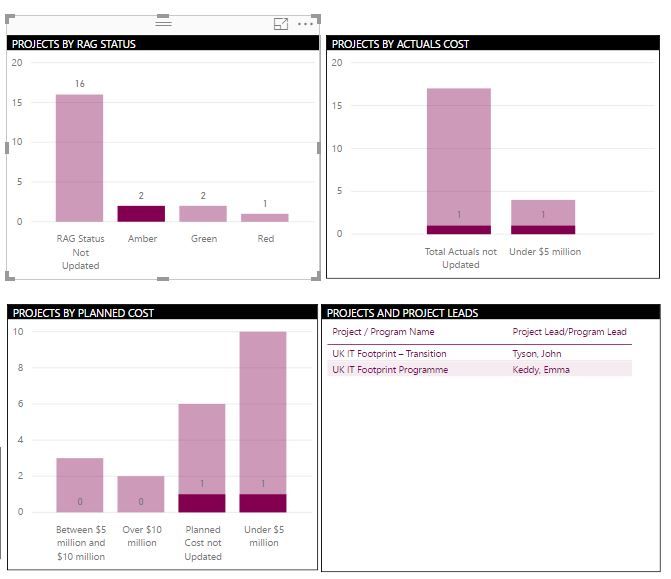
I need some help with building visual interactions on my dashboard. I have attached a snapshot of my dashboard here. what I am looking for is - When I click on the 'Amber' column in 'Projects by RAG status' visual, all the other visuals get filtered. Now, keeping the Projects by RAG Status filtered at 'Amber', I would like to filter down to the column 'Under $5 million' in the second visual titled 'Projects by Actual Cost'. Is this something that I can build into Power BI? All the data comes from a single table, in case that helps.
we can do this by 'Ctrl+click' on the bar instead of just clicking the bar
Hi @Anonymous,
I am not sure if it's possible, as far as I know if u activate the "Drilling filter others visuals" option you can filter all columns from the others visual.
https://docs.microsoft.com/en-us/power-bi/service-reports-visual-interactions
Thanks,
Ricardo
The Power BI Data Visualization World Championships is back! Get ahead of the game and start preparing now!
| User | Count |
|---|---|
| 39 | |
| 37 | |
| 33 | |
| 32 | |
| 29 |
| User | Count |
|---|---|
| 133 | |
| 88 | |
| 85 | |
| 68 | |
| 64 |