This time we’re going bigger than ever. Fabric, Power BI, SQL, AI and more. We're covering it all. You won't want to miss it.
Learn moreGet Fabric Certified for FREE during AI Skills Fest. This week only. Secure your voucher now.
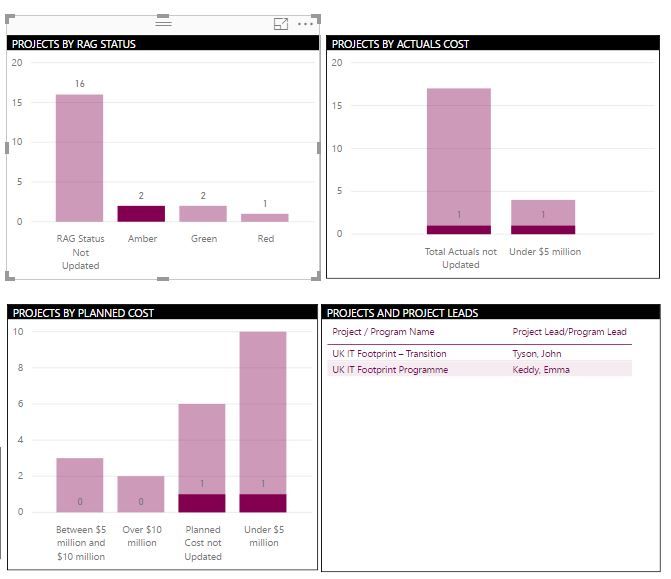
I need some help with building visual interactions on my dashboard. I have attached a snapshot of my dashboard here. what I am looking for is - When I click on the 'Amber' column in 'Projects by RAG status' visual, all the other visuals get filtered. Now, keeping the Projects by RAG Status filtered at 'Amber', I would like to filter down to the column 'Under $5 million' in the second visual titled 'Projects by Actual Cost'. Is this something that I can build into Power BI? All the data comes from a single table, in case that helps.
we can do this by 'Ctrl+click' on the bar instead of just clicking the bar
Hi @Anonymous,
I am not sure if it's possible, as far as I know if u activate the "Drilling filter others visuals" option you can filter all columns from the others visual.
https://docs.microsoft.com/en-us/power-bi/service-reports-visual-interactions
Thanks,
Ricardo
Check out the May 2026 Power BI update to learn about new features.
Sign up to receive a private message when registration opens and key events begin.
If you have recently started exploring Fabric, we'd love to hear how it's going. Your feedback can help with product improvements.
| User | Count |
|---|---|
| 25 | |
| 24 | |
| 22 | |
| 19 | |
| 18 |
| User | Count |
|---|---|
| 43 | |
| 42 | |
| 41 | |
| 21 | |
| 21 |