Learn from the best! Meet the four finalists headed to the FINALS of the Power BI Dataviz World Championships! Register now
Hi all,
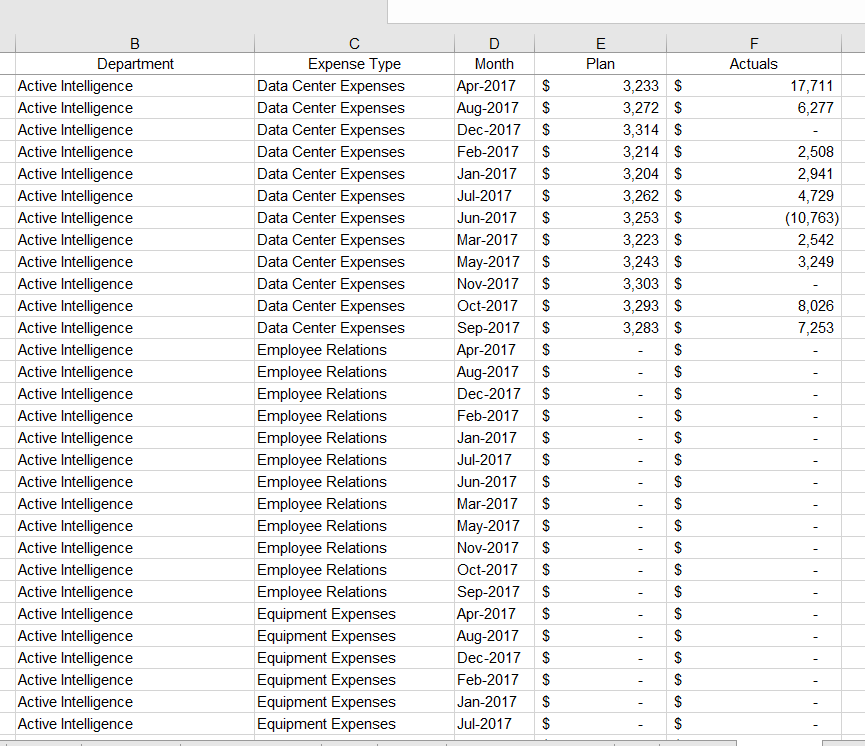
I have the data shown below:
I've input this data into Power BI and created a Matrix as shown below.
Department and Month values are used as drop down filters.
Unfortuntly, Power BI aggereages and sums all the Variance %s as shown in the last column. Is there a way to have the Variance % column calculted in an Ad Hoc based manner based on whatever is selected.
The formula i have for the Variance % column is: Variance % = IFERROR(Combined[Variance $]/Combined[Plan],0)
Thank you,
Solved! Go to Solution.
add new measure for variance %
% Variance = var variance = SUM(Table[Plan]) - SUM(Table[Actuals]) return DIVIDE(variance, SUM(Table[Plan]), 0)
in data modelling tab change % Variance type to percentage.
I prefer different measure for each calculation thou like this
Total Actual = SUM(Table[Actual]) Total Plan = SUM(Table[Plan]) Total Variance = [Total Plan] - [Total Actual] % Variance = DIVIDE([Total Variance], [Total Plan], 0)
Subscribe to the @PowerBIHowTo YT channel for an upcoming video on List and Record functions in Power Query!!
Learn Power BI and Fabric - subscribe to our YT channel - Click here: @PowerBIHowTo
If my solution proved useful, I'd be delighted to receive Kudos. When you put effort into asking a question, it's equally thoughtful to acknowledge and give Kudos to the individual who helped you solve the problem. It's a small gesture that shows appreciation and encouragement! ❤
Did I answer your question? Mark my post as a solution. Proud to be a Super User! Appreciate your Kudos 🙂
Feel free to email me with any of your BI needs.
add new measure for variance %
% Variance = var variance = SUM(Table[Plan]) - SUM(Table[Actuals]) return DIVIDE(variance, SUM(Table[Plan]), 0)
in data modelling tab change % Variance type to percentage.
I prefer different measure for each calculation thou like this
Total Actual = SUM(Table[Actual]) Total Plan = SUM(Table[Plan]) Total Variance = [Total Plan] - [Total Actual] % Variance = DIVIDE([Total Variance], [Total Plan], 0)
Subscribe to the @PowerBIHowTo YT channel for an upcoming video on List and Record functions in Power Query!!
Learn Power BI and Fabric - subscribe to our YT channel - Click here: @PowerBIHowTo
If my solution proved useful, I'd be delighted to receive Kudos. When you put effort into asking a question, it's equally thoughtful to acknowledge and give Kudos to the individual who helped you solve the problem. It's a small gesture that shows appreciation and encouragement! ❤
Did I answer your question? Mark my post as a solution. Proud to be a Super User! Appreciate your Kudos 🙂
Feel free to email me with any of your BI needs.
| User | Count |
|---|---|
| 57 | |
| 43 | |
| 32 | |
| 16 | |
| 13 |
| User | Count |
|---|---|
| 84 | |
| 70 | |
| 38 | |
| 27 | |
| 24 |