
Learn from the best! Meet the four finalists headed to the FINALS of the Power BI Dataviz World Championships! Register now
Hello all,
Loving Power BI, but I stumble there once in a while. I now need to create variance measures to compare my ACT, BUD, PY figures
(e.g. "$ Var ACT vs BUD"). I managed to create the needed variance measures, and they work fine - my rows (e.g. products, regions, sub-product) filter them out perfectly, but that is happening in a separate table, though.
However, when I want to put them into my Matrix visualization, they are affected by my Column 'Actuality name' which shows ACT, BUD and PY (outlined in red) figures that come from a single value column ('YTD') in my Facts table. I would like to put my variance measures right of the ACT,BUD, PY figures (outlined in green).
Ideally, I do not want to create new Actual, Budget, Prior Year measures and drop them into the Values area one by one (which probably would be the easiest method?).
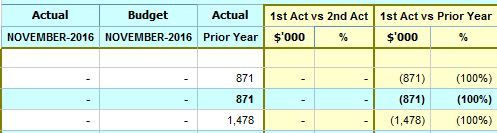
Hence, I am looking for a DAX formula, the results of which are not affected by the Actuality names as Columns. The outcome should be something like this:
My fact table view:
Column ACT: has all the actuality names (e.g. ACT, BUD, PY, FC, BUD1, BUD2 etc)
Column YTD: is my value column in this case.
Thanks
Ged
Update:
I was able to sort my case with creating separate measures for Actual, Budget, Prior Year figures. However, I do not see that as a sustainable solution as this leads a whole lot of customization, which I am trying to avoid as much as I can. It also, is impacting on the performance - all those FILTER clauses that scan every row.
Hence, I would be grateful for any other approach.
| User | Count |
|---|---|
| 50 | |
| 39 | |
| 29 | |
| 18 | |
| 17 |
| User | Count |
|---|---|
| 68 | |
| 57 | |
| 40 | |
| 22 | |
| 19 |