cancel
Showing results for 
Search instead for 
Did you mean: 

We've captured the moments from FabCon & SQLCon that everyone is talking about, and we are bringing them to the community, live and on-demand. Starts on April 14th. Register now

Reply
Ged
Helper I
Helper I

Variance Measures (DirectQuery; same column values, Matrix)

Hello all, 


Loving Power BI, but I stumble there once in a while. I now need to create variance measures to compare my ACT, BUD, PY figures

(e.g. "$ Var ACT vs BUD"). I managed to create the needed variance measures, and they work fine - my rows (e.g. products, regions, sub-product) filter them out perfectly, but that is happening in a separate table, though.


However, when I want to put them into my Matrix visualization, they are affected by my Column 'Actuality name' which shows ACT, BUD and PY (outlined in red) figures that come from a single value column ('YTD') in my Facts table. I would like to put my variance measures right of the ACT,BUD, PY figures (outlined in green).


 Var Measure.jpg


Ideally, I do not want to create new Actual, Budget, Prior Year measures and drop them into the Values area one by one (which probably would be the easiest method?).


Hence, I am looking for a DAX formula, the results of which are not affected by the Actuality names as Columns. The outcome should be something like this:
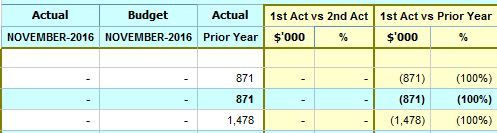
Var Outcome.JPG


My fact table view:

Fact Table.JPG

Column ACT: has all the actuality names (e.g. ACT, BUD, PY, FC, BUD1, BUD2 etc)

Column YTD: is my value column in this case.


Thanks

Ged


1 REPLY 1
Ged
Helper I
Helper I

Update:


I was able to sort my case with creating separate measures for Actual, Budget, Prior Year figures. However, I do not see that as a sustainable solution as this leads a whole lot of customization, which I am trying to avoid as much as I can. It also, is impacting on the performance  - all those FILTER clauses that scan every row.


Hence, I would be grateful for any other approach.

Helpful resources

Announcements
New to Fabric survey Carousel

New to Fabric Survey

If you have recently started exploring Fabric, we'd love to hear how it's going. Your feedback can help with product improvements.

Power BI DataViz World Championships carousel

Power BI DataViz World Championships - June 2026

A new Power BI DataViz World Championship is coming this June! Don't miss out on submitting your entry.

Join our Fabric User Panel

Join our Fabric User Panel

Share feedback directly with Fabric product managers, participate in targeted research studies and influence the Fabric roadmap.

March Power BI Update Carousel

Power BI Community Update - March 2026

Check out the March 2026 Power BI update to learn about new features.
