cancel
Showing results for 
Search instead for 
Did you mean: 

July 28 - August 9 | Final Round of the Power BI Dataviz World Championships. This is your chance. Learn more

Reply
Ged
Helper I
Helper I

Variance Measures (DirectQuery; same column values, Matrix)

Hello all, 


Loving Power BI, but I stumble there once in a while. I now need to create variance measures to compare my ACT, BUD, PY figures

(e.g. "$ Var ACT vs BUD"). I managed to create the needed variance measures, and they work fine - my rows (e.g. products, regions, sub-product) filter them out perfectly, but that is happening in a separate table, though.


However, when I want to put them into my Matrix visualization, they are affected by my Column 'Actuality name' which shows ACT, BUD and PY (outlined in red) figures that come from a single value column ('YTD') in my Facts table. I would like to put my variance measures right of the ACT,BUD, PY figures (outlined in green).


 Var Measure.jpg


Ideally, I do not want to create new Actual, Budget, Prior Year measures and drop them into the Values area one by one (which probably would be the easiest method?).


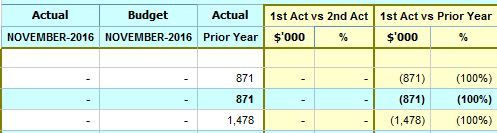
Hence, I am looking for a DAX formula, the results of which are not affected by the Actuality names as Columns. The outcome should be something like this:
Var Outcome.JPG


My fact table view:

Fact Table.JPG

Column ACT: has all the actuality names (e.g. ACT, BUD, PY, FC, BUD1, BUD2 etc)

Column YTD: is my value column in this case.


Thanks

Ged


1 REPLY 1
Ged
Helper I
Helper I

Update:


I was able to sort my case with creating separate measures for Actual, Budget, Prior Year figures. However, I do not see that as a sustainable solution as this leads a whole lot of customization, which I am trying to avoid as much as I can. It also, is impacting on the performance  - all those FILTER clauses that scan every row.


Hence, I would be grateful for any other approach.

Helpful resources

Announcements
Fabric Community Sticker Design Challenge Barcelona Carousel

Fabric Community Sticker Challenge - Barcelona 2026

If you love stickers, then you will definitely want to check out our community sticker challenge, Barcelona edition!

July Power BI Update Carousel

Power BI Monthly Update - July 2026

Check out the July 2026 Power BI update to learn about new features.

Power BI DataViz World Championships carousel

Power BI DataViz World Championships - June 2026

A new Power BI DataViz World Championship is coming this June! Don't miss out on submitting your entry.

Top Solution Authors
