
cancel
Showing results for 
Search instead for 
Did you mean: 

Learn from the best! Meet the four finalists headed to the FINALS of the Power BI Dataviz World Championships! Register now

Reply
Niraj_vora0106
Helper III
Helper III

Value / Format function

Hi, community

I have a doubt regarding Values / Format DAX in Power BI Desktop.


I'm using 2 Filter functions in a DAX, yes there's a connection between 2 tables ie: Query & OrderMapping


below is the DAX code:

Niraj_vora0106_2-1688549743849.png


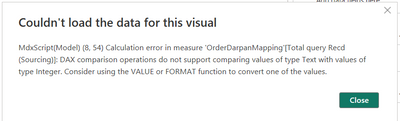
I'm getting the following error:

Niraj_vora0106_1-1688549719243.png


Please help how do I solve using Value / Format function.


1 ACCEPTED SOLUTION
Anonymous
Not applicable

Hi @Niraj_vora0106 ,

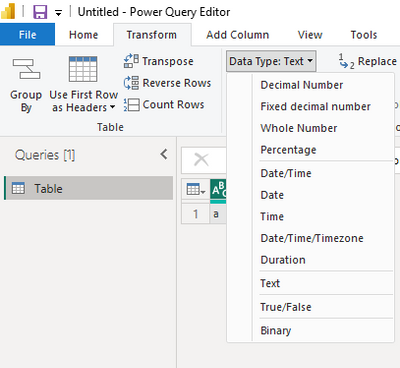
How about changing the column type here?

vrongtiepmsft_0-1688966637161.png


Or you can change the number 1 to "1". Then the number 1 is the text type.


How to Get Your Question Answered Quickly 


If it does not help, please provide more details with your desired output and pbix file without privacy information (or some sample data) .


Best Regards
Community Support Team _ Rongtie

If this post helps, then please consider Accept it as the solution to help the other members find it more quickly.


View solution in original post

4 REPLIES 4
Anonymous
Not applicable

Hi @Niraj_vora0106 ,

The error has pointed out that this is because of your data type. Please check if column Queryrespnsibility is of type number.


Please check the columns' type.


How to Get Your Question Answered Quickly 


If it does not help, please provide more details with your desired output and pbix file without privacy information (or some sample data) .


Best Regards
Community Support Team _ Rongtie

If this post helps, then please consider Accept it as the solution to help the other members find it more quickly.


@Anonymous 


How can I change QueryResponsibility type to number when the values are in String / Text..?


are you trying to say I need to have both values similar? then only multiple Filter conditions will work..??

Anonymous
Not applicable

Hi @Niraj_vora0106 ,

How about changing the column type here?

vrongtiepmsft_0-1688966637161.png


Or you can change the number 1 to "1". Then the number 1 is the text type.


How to Get Your Question Answered Quickly 


If it does not help, please provide more details with your desired output and pbix file without privacy information (or some sample data) .


Best Regards
Community Support Team _ Rongtie

If this post helps, then please consider Accept it as the solution to help the other members find it more quickly.


@Anonymous 


I'll try changing the Number value from 1 to "1".

Thank you so much for your help!

Helpful resources

Announcements
Join our Fabric User Panel

Join our Fabric User Panel

Share feedback directly with Fabric product managers, participate in targeted research studies and influence the Fabric roadmap.

February Power BI Update Carousel

Power BI Monthly Update - February 2026

Check out the February 2026 Power BI update to learn about new features.

FabCon Atlanta 2026 carousel

FabCon Atlanta 2026

Join us at FabCon Atlanta, March 16-20, for the ultimate Fabric, Power BI, AI and SQL community-led event. Save $200 with code FABCOMM.