
This time we’re going bigger than ever. Fabric, Power BI, SQL, AI and more. We're covering it all. You won't want to miss it.
Learn moreLevel up your Power BI skills this month - build one visual each week and tell better stories with data! Get started
Hi, community
I have a doubt regarding Values / Format DAX in Power BI Desktop.
I'm using 2 Filter functions in a DAX, yes there's a connection between 2 tables ie: Query & OrderMapping
below is the DAX code:
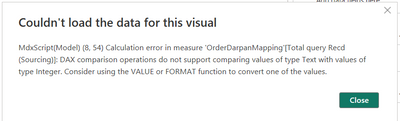
I'm getting the following error:
Please help how do I solve using Value / Format function.
Solved! Go to Solution.
Hi @Niraj_vora0106 ,
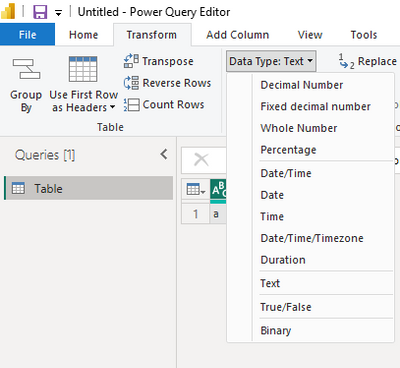
How about changing the column type here?
Or you can change the number 1 to "1". Then the number 1 is the text type.
How to Get Your Question Answered Quickly
If it does not help, please provide more details with your desired output and pbix file without privacy information (or some sample data) .
Best Regards
Community Support Team _ Rongtie
If this post helps, then please consider Accept it as the solution to help the other members find it more quickly.
Hi @Niraj_vora0106 ,
The error has pointed out that this is because of your data type. Please check if column Queryrespnsibility is of type number.
Please check the columns' type.
How to Get Your Question Answered Quickly
If it does not help, please provide more details with your desired output and pbix file without privacy information (or some sample data) .
Best Regards
Community Support Team _ Rongtie
If this post helps, then please consider Accept it as the solution to help the other members find it more quickly.
@Anonymous
How can I change QueryResponsibility type to number when the values are in String / Text..?
are you trying to say I need to have both values similar? then only multiple Filter conditions will work..??
Hi @Niraj_vora0106 ,
How about changing the column type here?
Or you can change the number 1 to "1". Then the number 1 is the text type.
How to Get Your Question Answered Quickly
If it does not help, please provide more details with your desired output and pbix file without privacy information (or some sample data) .
Best Regards
Community Support Team _ Rongtie
If this post helps, then please consider Accept it as the solution to help the other members find it more quickly.
@Anonymous
I'll try changing the Number value from 1 to "1".
Thank you so much for your help!
Check out the April 2026 Power BI update to learn about new features.
Sign up to receive a private message when registration opens and key events begin.
If you have recently started exploring Fabric, we'd love to hear how it's going. Your feedback can help with product improvements.
| User | Count |
|---|---|
| 36 | |
| 33 | |
| 31 | |
| 24 | |
| 18 |
| User | Count |
|---|---|
| 68 | |
| 50 | |
| 33 | |
| 24 | |
| 24 |