
Don't miss your chance to take the Fabric Data Engineer (DP-600) exam for FREE! Find out how by attending the DP-600 session on April 23rd (pacific time), live or on-demand.
Learn moreNext up in the FabCon + SQLCon recap series: The roadmap for Microsoft SQL and Maximizing Developer experiences in Fabric. All sessions are available on-demand after the live show. Register now
Hi, community
I have a doubt regarding Values / Format DAX in Power BI Desktop.
I'm using 2 Filter functions in a DAX, yes there's a connection between 2 tables ie: Query & OrderMapping
below is the DAX code:
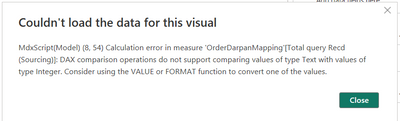
I'm getting the following error:
Please help how do I solve using Value / Format function.
Solved! Go to Solution.
Hi @Niraj_vora0106 ,
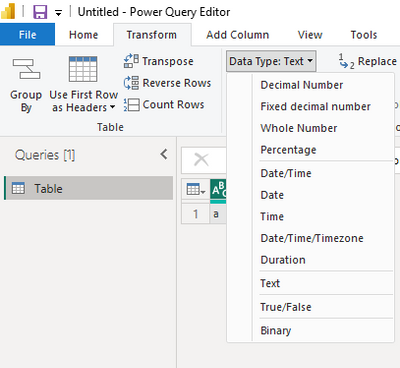
How about changing the column type here?
Or you can change the number 1 to "1". Then the number 1 is the text type.
How to Get Your Question Answered Quickly
If it does not help, please provide more details with your desired output and pbix file without privacy information (or some sample data) .
Best Regards
Community Support Team _ Rongtie
If this post helps, then please consider Accept it as the solution to help the other members find it more quickly.
Hi @Niraj_vora0106 ,
The error has pointed out that this is because of your data type. Please check if column Queryrespnsibility is of type number.
Please check the columns' type.
How to Get Your Question Answered Quickly
If it does not help, please provide more details with your desired output and pbix file without privacy information (or some sample data) .
Best Regards
Community Support Team _ Rongtie
If this post helps, then please consider Accept it as the solution to help the other members find it more quickly.
@Anonymous
How can I change QueryResponsibility type to number when the values are in String / Text..?
are you trying to say I need to have both values similar? then only multiple Filter conditions will work..??
Hi @Niraj_vora0106 ,
How about changing the column type here?
Or you can change the number 1 to "1". Then the number 1 is the text type.
How to Get Your Question Answered Quickly
If it does not help, please provide more details with your desired output and pbix file without privacy information (or some sample data) .
Best Regards
Community Support Team _ Rongtie
If this post helps, then please consider Accept it as the solution to help the other members find it more quickly.
@Anonymous
I'll try changing the Number value from 1 to "1".
Thank you so much for your help!
If you have recently started exploring Fabric, we'd love to hear how it's going. Your feedback can help with product improvements.
A new Power BI DataViz World Championship is coming this June! Don't miss out on submitting your entry.
Share feedback directly with Fabric product managers, participate in targeted research studies and influence the Fabric roadmap.
| User | Count |
|---|---|
| 48 | |
| 45 | |
| 41 | |
| 20 | |
| 17 |
| User | Count |
|---|---|
| 69 | |
| 64 | |
| 32 | |
| 31 | |
| 27 |