cancel
Showing results for 
Search instead for 
Did you mean: 

The FabCon + SQLCon recap series starts April 14th at 8am Pacific. If you’re tracking where AI is going inside Fabric, this first session is a can't miss. Register now

Reply
rawiswarden
Helper I
Helper I

Using Variable Instead of Column Reference

Is something like this possible in a calculated column?  I want to create these sort of bins for multiple columns and want to do it the most efficient way possible.  If there is another built-in method in power BI, feel free to share.  I just want bins that are somewhat evenly populated.


Monthly Income (Bin) =
VAR __Column = Dimension_Portstats[MonthlyIncome]

RETURN

VAR __25pct = PERCENTILE.INC(__Column, 0.25)
VAR __50pct = PERCENTILE.INC(__Column, 0.50)
VAR __75pct = PERCENTILE.INC(__Column, 0.75)

VAR __25label = "["&min(__Column)&"-"&PERCENTILE.INC(__Column, 0.25)&"]"
VAR __50label = "("&PERCENTILE.INC(__Column, 0.25)&"-"&PERCENTILE.INC(__Column, 0.50)&"]"
VAR __75label = "("&PERCENTILE.INC(__Column, 0.5)&"-"&PERCENTILE.INC(__Column, 0.75)&"]"
VAR __100label = "("&PERCENTILE.INC(__Column, 0.75)&"+]"

RETURN

SWITCH(TRUE,
__Column <= __25pct, __25label,
__Column <= __50pct, __50label,
__Column <= __75pct, __75label,
__100label)


1 ACCEPTED SOLUTION
v-lid-msft
Community Support
Community Support

Hi @rawiswarden ,


Sorry for that We cannot find an effective way to add variables with a column and use it the PERCENTILE.INC function.

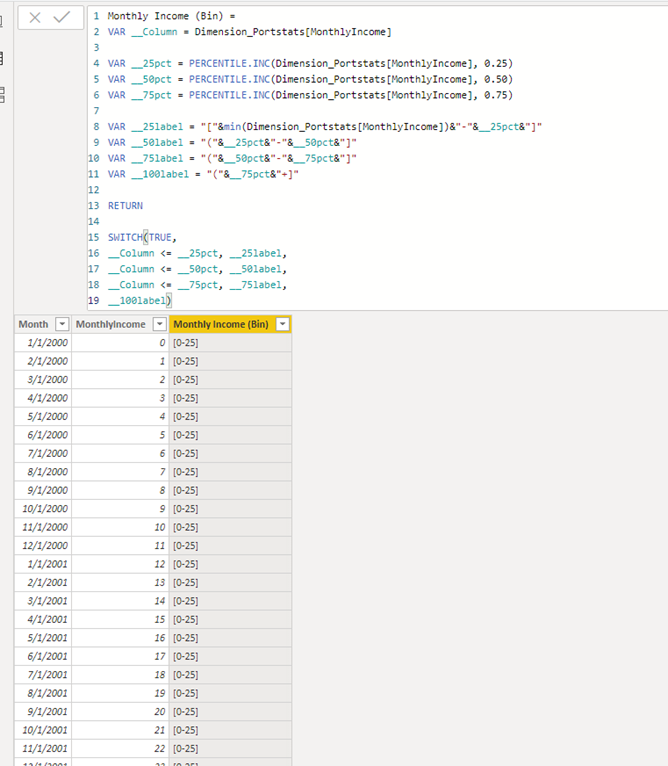
But we can simplify the formula as following,  If you want to create another measure such as yearly, just chang the Dimension_Portstats[MonthlyIncome] to the column in this formula.


Monthly Income (Bin) = 
VAR __Column = Dimension_Portstats[MonthlyIncome]

VAR __25pct = PERCENTILE.INC(Dimension_Portstats[MonthlyIncome], 0.25)
VAR __50pct = PERCENTILE.INC(Dimension_Portstats[MonthlyIncome], 0.50)
VAR __75pct = PERCENTILE.INC(Dimension_Portstats[MonthlyIncome], 0.75)

VAR __25label = "["&min(Dimension_Portstats[MonthlyIncome])&"-"&__25pct&"]"
VAR __50label = "("&__25pct&"-"&__50pct&"]"
VAR __75label = "("&__50pct&"-"&__75pct&"]"
VAR __100label = "("&__75pct&"+]"

RETURN

SWITCH(TRUE,
__Column <= __25pct, __25label,
__Column <= __50pct, __50label,
__Column <= __75pct, __75label,
__100label)


1.png


If it doesn’t meet your requirement, could you please show the exact expected result based on the table that we have shared?


Best regards,


Community Support Team _ Dong Li
If this post helps, then please consider Accept it as the solution to help the other members find it more quickly.

View solution in original post

2 REPLIES 2
v-lid-msft
Community Support
Community Support

Hi @rawiswarden ,


Sorry for that We cannot find an effective way to add variables with a column and use it the PERCENTILE.INC function.

But we can simplify the formula as following,  If you want to create another measure such as yearly, just chang the Dimension_Portstats[MonthlyIncome] to the column in this formula.


Monthly Income (Bin) = 
VAR __Column = Dimension_Portstats[MonthlyIncome]

VAR __25pct = PERCENTILE.INC(Dimension_Portstats[MonthlyIncome], 0.25)
VAR __50pct = PERCENTILE.INC(Dimension_Portstats[MonthlyIncome], 0.50)
VAR __75pct = PERCENTILE.INC(Dimension_Portstats[MonthlyIncome], 0.75)

VAR __25label = "["&min(Dimension_Portstats[MonthlyIncome])&"-"&__25pct&"]"
VAR __50label = "("&__25pct&"-"&__50pct&"]"
VAR __75label = "("&__50pct&"-"&__75pct&"]"
VAR __100label = "("&__75pct&"+]"

RETURN

SWITCH(TRUE,
__Column <= __25pct, __25label,
__Column <= __50pct, __50label,
__Column <= __75pct, __75label,
__100label)


1.png


If it doesn’t meet your requirement, could you please show the exact expected result based on the table that we have shared?


Best regards,


Community Support Team _ Dong Li
If this post helps, then please consider Accept it as the solution to help the other members find it more quickly.

I'd prefer to only have to change the column in one place, but I'll take what I can get!

Helpful resources

Announcements
New to Fabric survey Carousel

New to Fabric Survey

If you have recently started exploring Fabric, we'd love to hear how it's going. Your feedback can help with product improvements.

Power BI DataViz World Championships carousel

Power BI DataViz World Championships - June 2026

A new Power BI DataViz World Championship is coming this June! Don't miss out on submitting your entry.

Join our Fabric User Panel

Join our Fabric User Panel

Share feedback directly with Fabric product managers, participate in targeted research studies and influence the Fabric roadmap.

March Power BI Update Carousel

Power BI Community Update - March 2026

Check out the March 2026 Power BI update to learn about new features.