cancel
Showing results for 
Search instead for 
Did you mean: 

The Power BI Data Visualization World Championships is back! Get ahead of the game and start preparing now! Learn more

Reply
rawiswarden
Helper I
Helper I

Using Variable Instead of Column Reference

Is something like this possible in a calculated column?  I want to create these sort of bins for multiple columns and want to do it the most efficient way possible.  If there is another built-in method in power BI, feel free to share.  I just want bins that are somewhat evenly populated.


Monthly Income (Bin) =
VAR __Column = Dimension_Portstats[MonthlyIncome]

RETURN

VAR __25pct = PERCENTILE.INC(__Column, 0.25)
VAR __50pct = PERCENTILE.INC(__Column, 0.50)
VAR __75pct = PERCENTILE.INC(__Column, 0.75)

VAR __25label = "["&min(__Column)&"-"&PERCENTILE.INC(__Column, 0.25)&"]"
VAR __50label = "("&PERCENTILE.INC(__Column, 0.25)&"-"&PERCENTILE.INC(__Column, 0.50)&"]"
VAR __75label = "("&PERCENTILE.INC(__Column, 0.5)&"-"&PERCENTILE.INC(__Column, 0.75)&"]"
VAR __100label = "("&PERCENTILE.INC(__Column, 0.75)&"+]"

RETURN

SWITCH(TRUE,
__Column <= __25pct, __25label,
__Column <= __50pct, __50label,
__Column <= __75pct, __75label,
__100label)


1 ACCEPTED SOLUTION
v-lid-msft
Community Support
Community Support

Hi @rawiswarden ,


Sorry for that We cannot find an effective way to add variables with a column and use it the PERCENTILE.INC function.

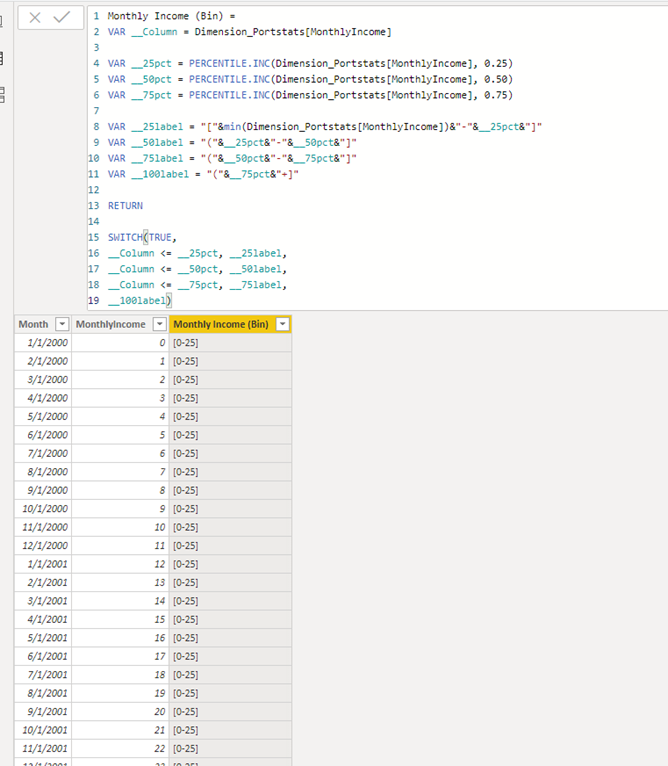
But we can simplify the formula as following,  If you want to create another measure such as yearly, just chang the Dimension_Portstats[MonthlyIncome] to the column in this formula.


Monthly Income (Bin) = 
VAR __Column = Dimension_Portstats[MonthlyIncome]

VAR __25pct = PERCENTILE.INC(Dimension_Portstats[MonthlyIncome], 0.25)
VAR __50pct = PERCENTILE.INC(Dimension_Portstats[MonthlyIncome], 0.50)
VAR __75pct = PERCENTILE.INC(Dimension_Portstats[MonthlyIncome], 0.75)

VAR __25label = "["&min(Dimension_Portstats[MonthlyIncome])&"-"&__25pct&"]"
VAR __50label = "("&__25pct&"-"&__50pct&"]"
VAR __75label = "("&__50pct&"-"&__75pct&"]"
VAR __100label = "("&__75pct&"+]"

RETURN

SWITCH(TRUE,
__Column <= __25pct, __25label,
__Column <= __50pct, __50label,
__Column <= __75pct, __75label,
__100label)


1.png


If it doesn’t meet your requirement, could you please show the exact expected result based on the table that we have shared?


Best regards,


Community Support Team _ Dong Li
If this post helps, then please consider Accept it as the solution to help the other members find it more quickly.

View solution in original post

2 REPLIES 2
v-lid-msft
Community Support
Community Support

Hi @rawiswarden ,


Sorry for that We cannot find an effective way to add variables with a column and use it the PERCENTILE.INC function.

But we can simplify the formula as following,  If you want to create another measure such as yearly, just chang the Dimension_Portstats[MonthlyIncome] to the column in this formula.


Monthly Income (Bin) = 
VAR __Column = Dimension_Portstats[MonthlyIncome]

VAR __25pct = PERCENTILE.INC(Dimension_Portstats[MonthlyIncome], 0.25)
VAR __50pct = PERCENTILE.INC(Dimension_Portstats[MonthlyIncome], 0.50)
VAR __75pct = PERCENTILE.INC(Dimension_Portstats[MonthlyIncome], 0.75)

VAR __25label = "["&min(Dimension_Portstats[MonthlyIncome])&"-"&__25pct&"]"
VAR __50label = "("&__25pct&"-"&__50pct&"]"
VAR __75label = "("&__50pct&"-"&__75pct&"]"
VAR __100label = "("&__75pct&"+]"

RETURN

SWITCH(TRUE,
__Column <= __25pct, __25label,
__Column <= __50pct, __50label,
__Column <= __75pct, __75label,
__100label)


1.png


If it doesn’t meet your requirement, could you please show the exact expected result based on the table that we have shared?


Best regards,


Community Support Team _ Dong Li
If this post helps, then please consider Accept it as the solution to help the other members find it more quickly.

I'd prefer to only have to change the column in one place, but I'll take what I can get!

Helpful resources

Announcements
Power BI DataViz World Championships

Power BI Dataviz World Championships

The Power BI Data Visualization World Championships is back! Get ahead of the game and start preparing now!

December 2025 Power BI Update Carousel

Power BI Monthly Update - December 2025

Check out the December 2025 Power BI Holiday Recap!

FabCon Atlanta 2026 carousel

FabCon Atlanta 2026

Join us at FabCon Atlanta, March 16-20, for the ultimate Fabric, Power BI, AI and SQL community-led event. Save $200 with code FABCOMM.