Join us at FabCon Atlanta from March 16 - 20, 2026, for the ultimate Fabric, Power BI, AI and SQL community-led event. Save $200 with code FABCOMM.
Register now!Get Fabric certified for FREE! Don't miss your chance! Learn more
Good afternoon,
Please could someone help me with an issue I am struggling with. I have a Calendar dimension table that contains flags ("Y") for all UK Bank Holidays.
I am trying to create an expression where:
The formula (which is not working) is:
NetWorkDays Summarize variable=
VAR colHolidays =
SUMMARIZE(FILTER(dimCalendar,dimCalendar[flgHoliday]="Y"),dimCalendar[Date])
RETURN
NETWORKDAYS(MAX(Projects[start_date]),MAX(Projects[end_date]),1,colHolidays)
The reason I thought this would work is I was able get the correct results by doing this in two stages:
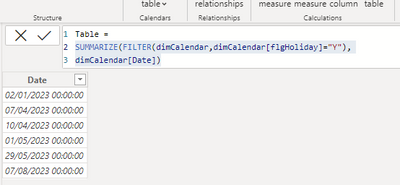
First by creating a table using that SUMMARIZE formula
Table =
SUMMARIZE(FILTER(dimCalendar,dimCalendar[flgHoliday]="Y"),
dimCalendar[Date])
And then I referenced that table in a NETWORKDAYS expression and it worked:
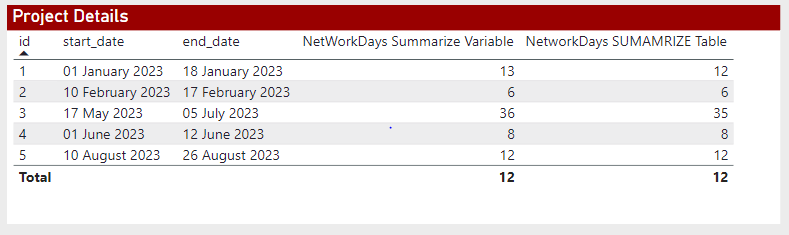
NetworkDays SUMAMRIZE Table = NETWORKDAYS(MAX(Projects[start_date]),MAX(Projects[end_date]),1,'Table')
Here is a screenshot of the table of results:
Please can you help me fix my variable definition?
Kind regards,
Paul
Solved! Go to Solution.
@PaulVanS267 Yep, that did it, here is the fix:
NetWorkDays Summarize Variable = //Not returning the correct result
VAR colHolidays =
SUMMARIZE(FILTER(ALL(dimCalendar),dimCalendar[flgHoliday]="Y"),dimCalendar[Date])
RETURN
NETWORKDAYS(MAX(Projects[start_date]),MAX(Projects[end_date]),1,colHolidays)
@PaulVanS267 Very odd. I can't replicate that. NETWORKDAYS accepts a virtual table as the 4th argument. PBIX is attached below signature.
Thank you for reaching out.
I have attached the pbix for you to look at. Perhaps it will be easier to identify the issue?
Kind regards,
Paul
@PaulVanS267 Yep, that did it, here is the fix:
NetWorkDays Summarize Variable = //Not returning the correct result
VAR colHolidays =
SUMMARIZE(FILTER(ALL(dimCalendar),dimCalendar[flgHoliday]="Y"),dimCalendar[Date])
RETURN
NETWORKDAYS(MAX(Projects[start_date]),MAX(Projects[end_date]),1,colHolidays)
Share feedback directly with Fabric product managers, participate in targeted research studies and influence the Fabric roadmap.
Check out the February 2026 Power BI update to learn about new features.
| User | Count |
|---|---|
| 70 | |
| 60 | |
| 47 | |
| 20 | |
| 16 |