cancel
Showing results for 
Search instead for 
Did you mean: 

The Power BI Data Visualization World Championships is back! It's time to submit your entry. Live now!

Reply
PaulVanS267
Frequent Visitor

Using SUMMARIZE as a variable in NETWORKDAYS expression

Good afternoon,


Please could someone help me with an issue I am struggling with.  I have a Calendar dimension table that contains flags ("Y") for all UK Bank Holidays.  


I am trying to create an expression where:

  1. I define a variable that returns the filtered column of dates that are public holidays (to achieve this I am using the SUMMARIZE function)
  2. Use this variable in the NETWORKDAYS expression as the <holiday> parameter


The formula (which is not working) is:

NetWorkDays Summarize variable= 
VAR colHolidays = 
SUMMARIZE(FILTER(dimCalendar,dimCalendar[flgHoliday]="Y"),dimCalendar[Date])
RETURN
NETWORKDAYS(MAX(Projects[start_date]),MAX(Projects[end_date]),1,colHolidays)


The reason I thought this would work is I was able get the correct results by doing this in two stages:

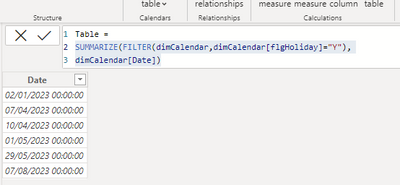
First by creating a table using that SUMMARIZE formula

Table = 
SUMMARIZE(FILTER(dimCalendar,dimCalendar[flgHoliday]="Y"),
dimCalendar[Date])
PaulVanS267_1-1685030426397.png


And then I referenced that table in a NETWORKDAYS expression and it worked:

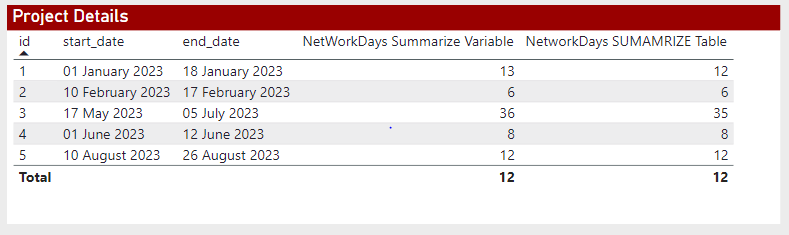
NetworkDays SUMAMRIZE Table = NETWORKDAYS(MAX(Projects[start_date]),MAX(Projects[end_date]),1,'Table')


Here is a screenshot of the table of results:
PaulVanS267_0-1685030234144.png


Please can you help me fix my variable definition?


Kind regards,

Paul


1 ACCEPTED SOLUTION

@PaulVanS267 Yep, that did it, here is the fix:

NetWorkDays Summarize Variable = //Not returning the correct result
VAR colHolidays = 
SUMMARIZE(FILTER(ALL(dimCalendar),dimCalendar[flgHoliday]="Y"),dimCalendar[Date])
RETURN
NETWORKDAYS(MAX(Projects[start_date]),MAX(Projects[end_date]),1,colHolidays) 


Follow on LinkedIn
@ me in replies or I'll lose your thread!!!
Instead of a Kudo, please vote for this idea
Become an expert!: Enterprise DNA
External Tools: MSHGQM
YouTube Channel!: Microsoft Hates Greg
Latest book!:
DAX For Humans

DAX is easy, CALCULATE makes DAX hard...

View solution in original post

4 REPLIES 4
Greg_Deckler
Community Champion
Community Champion

@PaulVanS267 Very odd. I can't replicate that. NETWORKDAYS accepts a virtual table as the 4th argument. PBIX is attached below signature.


Follow on LinkedIn
@ me in replies or I'll lose your thread!!!
Instead of a Kudo, please vote for this idea
Become an expert!: Enterprise DNA
External Tools: MSHGQM
YouTube Channel!: Microsoft Hates Greg
Latest book!:
DAX For Humans

DAX is easy, CALCULATE makes DAX hard...

Hi @Greg_Deckler 


Thank you for reaching out.

I have attached the pbix for you to look at. Perhaps it will be easier to identify the issue?

NetworkDays Example 


Kind regards,

Paul

@PaulVanS267 Yep, that did it, here is the fix:

NetWorkDays Summarize Variable = //Not returning the correct result
VAR colHolidays = 
SUMMARIZE(FILTER(ALL(dimCalendar),dimCalendar[flgHoliday]="Y"),dimCalendar[Date])
RETURN
NETWORKDAYS(MAX(Projects[start_date]),MAX(Projects[end_date]),1,colHolidays) 


Follow on LinkedIn
@ me in replies or I'll lose your thread!!!
Instead of a Kudo, please vote for this idea
Become an expert!: Enterprise DNA
External Tools: MSHGQM
YouTube Channel!: Microsoft Hates Greg
Latest book!:
DAX For Humans

DAX is easy, CALCULATE makes DAX hard...

Thank you so much @Greg_Deckler!


Works perfectly now.


Have a great day


Kind regards,

Paul

Helpful resources

Announcements
FabCon Atlanta 2026 carousel

FabCon Atlanta 2026

Join us at FabCon Atlanta, March 16-20, for the ultimate Fabric, Power BI, AI and SQL community-led event. Save $200 with code FABCOMM.