cancel
Showing results for 
Search instead for 
Did you mean: 

The Power BI Data Visualization World Championships is back! It's time to submit your entry. Live now!

Reply
joade2co
Frequent Visitor

Using Measure as a Visual Level Filter

I understand that we cannot use measure value as a visual level filter.

However, I'd like to filter visualization depending on measure value.

Would you know how to implement the function below?


cat_1cat_2value
AA2
AA1
AB3
BB4
BC5


[function]

・setting "cat_1" & "cat_2" as slicers

・making some visualization of measure of "value"

・if a number of rows with slicer's settings is less than 2, a visualization is hidden.

e.g.)

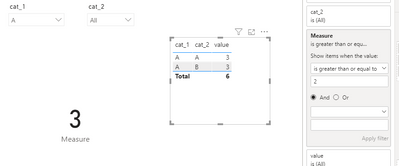
When we chose "A" in cat_1 and "all" in cat_2, a visualization is not hidden. (a number of rows is 3.)

When we chose "A" in cat_1 and "A" in cat_2, a visualization is not hidden. (a number of rows is 2.)

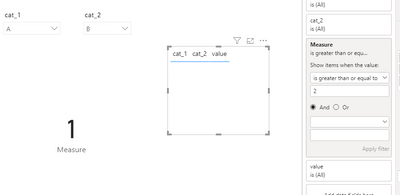
When we chose "A" in cat_1 and "B" in cat_2, a visualization is hidden. (a number of rows is 1.)


*** In my first idea, I set measure counting numbers of rows and set it as visual level filter.


1 ACCEPTED SOLUTION
Anonymous
Not applicable

Hi @joade2co ,


Create a measure and add it to visual filter as below.

Measure = COUNTROWS(ALLSELECTED('Table'))

 2.PNG3.PNG


Best Regards,

Jay

View solution in original post

2 REPLIES 2
Anonymous
Not applicable

Hi @joade2co ,


Create a measure and add it to visual filter as below.

Measure = COUNTROWS(ALLSELECTED('Table'))

 2.PNG3.PNG


Best Regards,

Jay

amitchandak
Super User
Super User

@joade2co , You will not be able to hide visual. You create a measure and return null.


example

Switch( true(),

Max([cat_1]) = "All"  &&  isfiltered([cat_2]) =False() , blank(),

[Measure]

)

Share with Power BI Enthusiasts: Full Power BI Video (20 Hours) YouTube
Microsoft Fabric Series 60+ Videos YouTube
Microsoft Fabric Hindi End to End YouTube

Helpful resources

Announcements
FabCon Atlanta 2026 carousel

FabCon Atlanta 2026

Join us at FabCon Atlanta, March 16-20, for the ultimate Fabric, Power BI, AI and SQL community-led event. Save $200 with code FABCOMM.