Don't miss your chance to take exam DP-600 or DP-700 on us!
Request nowLearn from the best! Meet the four finalists headed to the FINALS of the Power BI Dataviz World Championships! Register now
I understand that we cannot use measure value as a visual level filter.
However, I'd like to filter visualization depending on measure value.
Would you know how to implement the function below?
| cat_1 | cat_2 | value |
| A | A | 2 |
| A | A | 1 |
| A | B | 3 |
| B | B | 4 |
| B | C | 5 |
[function]
・setting "cat_1" & "cat_2" as slicers
・making some visualization of measure of "value"
・if a number of rows with slicer's settings is less than 2, a visualization is hidden.
e.g.)
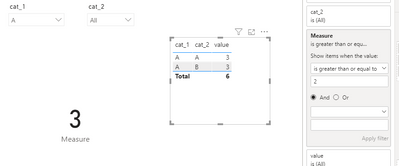
When we chose "A" in cat_1 and "all" in cat_2, a visualization is not hidden. (a number of rows is 3.)
When we chose "A" in cat_1 and "A" in cat_2, a visualization is not hidden. (a number of rows is 2.)
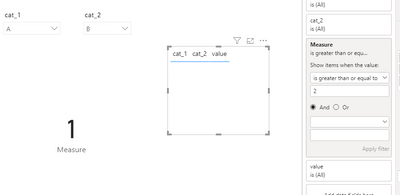
When we chose "A" in cat_1 and "B" in cat_2, a visualization is hidden. (a number of rows is 1.)
*** In my first idea, I set measure counting numbers of rows and set it as visual level filter.
Solved! Go to Solution.
Hi @joade2co ,
Create a measure and add it to visual filter as below.
Measure = COUNTROWS(ALLSELECTED('Table'))
Best Regards,
Jay
Hi @joade2co ,
Create a measure and add it to visual filter as below.
Measure = COUNTROWS(ALLSELECTED('Table'))
Best Regards,
Jay
@joade2co , You will not be able to hide visual. You create a measure and return null.
example
Switch( true(),
Max([cat_1]) = "All" && isfiltered([cat_2]) =False() , blank(),
[Measure]
)
Share feedback directly with Fabric product managers, participate in targeted research studies and influence the Fabric roadmap.
Check out the February 2026 Power BI update to learn about new features.
| User | Count |
|---|---|
| 49 | |
| 40 | |
| 37 | |
| 14 | |
| 14 |
| User | Count |
|---|---|
| 86 | |
| 69 | |
| 37 | |
| 29 | |
| 26 |