Join us at FabCon Atlanta from March 16 - 20, 2026, for the ultimate Fabric, Power BI, AI and SQL community-led event. Save $200 with code FABCOMM.
Register now!The Power BI Data Visualization World Championships is back! It's time to submit your entry. Live now!
hi everyone,
I'm new on Power BI, and i have a pb on Power BI Desktop.
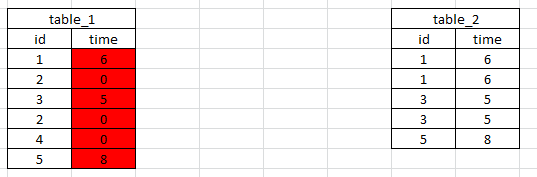
I have two tables and i want to link them. and I want a link from table_1 to table_2 and from table_2 to table_1
I need this link because i want to take cells of table_2 to put it in table_1 (like a vlookup in excel)
But there is not the same count of rows in the two tables.
for example i want create the red column
Thanks for your help. 🙂
Solved! Go to Solution.
Time in Table1 =
VAR myresult =
CALCULATE (
FIRSTNONBLANK ( Table2[time], 1 ),
FILTER ( Table2, Table2[id] = Table1[id] )
)
RETURN
IF ( ISBLANK ( myresult ), 0, myresult )
In table 2 you've got multiple rows for id, albeit with the same time - if it's always going to be the same time, just remove the duplicates in table 2 and you can then relate the two tables, if not, how is Power BI going to know which row to look up?
hi
thanks for your answer.
i need to keep all rows in table_2 because there are also different data in other columns
If there is a posibility to take the first value each time it will be the good thing for me. but i dont know if it is possible.
Time in Table1 =
VAR myresult =
CALCULATE (
FIRSTNONBLANK ( Table2[time], 1 ),
FILTER ( Table2, Table2[id] = Table1[id] )
)
RETURN
IF ( ISBLANK ( myresult ), 0, myresult )
By the way, you may help accept solution. Your contribution is highly appreciated.
| User | Count |
|---|---|
| 49 | |
| 37 | |
| 33 | |
| 22 | |
| 18 |
| User | Count |
|---|---|
| 132 | |
| 100 | |
| 56 | |
| 37 | |
| 37 |