Get certified for free when you join Fabric Data Days 2026 and dive into Fabric, Power BI, SQL, AI, and other essential data skills.
Join nowJuly 7 - July 17 | Round 2 of the Power BI Dataviz World Championships. Don't miss your chance! Learn more
hi everyone,
I'm new on Power BI, and i have a pb on Power BI Desktop.
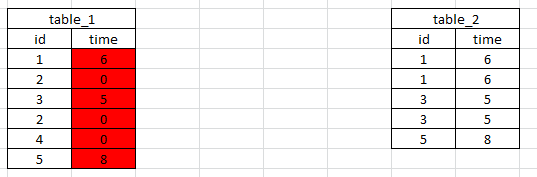
I have two tables and i want to link them. and I want a link from table_1 to table_2 and from table_2 to table_1
I need this link because i want to take cells of table_2 to put it in table_1 (like a vlookup in excel)
But there is not the same count of rows in the two tables.
for example i want create the red column
Thanks for your help. 🙂
Solved! Go to Solution.
Time in Table1 =
VAR myresult =
CALCULATE (
FIRSTNONBLANK ( Table2[time], 1 ),
FILTER ( Table2, Table2[id] = Table1[id] )
)
RETURN
IF ( ISBLANK ( myresult ), 0, myresult )
In table 2 you've got multiple rows for id, albeit with the same time - if it's always going to be the same time, just remove the duplicates in table 2 and you can then relate the two tables, if not, how is Power BI going to know which row to look up?
hi
thanks for your answer.
i need to keep all rows in table_2 because there are also different data in other columns
If there is a posibility to take the first value each time it will be the good thing for me. but i dont know if it is possible.
Time in Table1 =
VAR myresult =
CALCULATE (
FIRSTNONBLANK ( Table2[time], 1 ),
FILTER ( Table2, Table2[id] = Table1[id] )
)
RETURN
IF ( ISBLANK ( myresult ), 0, myresult )
By the way, you may help accept solution. Your contribution is highly appreciated.
Join us in Barcelona for FabCon and SQLCon, the Fabric, Power BI, SQL, and AI community event. Save €200 with code FABCMTY200.
Join Fabric Data Days 2026: 60 days of free live/on-demand sessions, challenges, study groups, and certification opportunities.
| User | Count |
|---|---|
| 24 | |
| 24 | |
| 17 | |
| 14 | |
| 13 |
| User | Count |
|---|---|
| 63 | |
| 41 | |
| 39 | |
| 39 | |
| 39 |