Don't miss your chance to take the Fabric Data Engineer (DP-600) exam for FREE! Find out how by watching the DP-600 session on-demand now through April 28th.
Learn moreJoin the FabCon + SQLCon recap series. Up next: Power BI, Real-Time Intelligence, IQ and AI, and Data Factory take center stage. All sessions are available on-demand after the live show. Register now
hi everyone,
I'm new on Power BI, and i have a pb on Power BI Desktop.
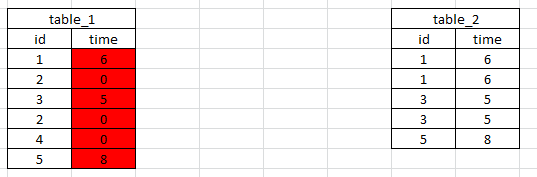
I have two tables and i want to link them. and I want a link from table_1 to table_2 and from table_2 to table_1
I need this link because i want to take cells of table_2 to put it in table_1 (like a vlookup in excel)
But there is not the same count of rows in the two tables.
for example i want create the red column
Thanks for your help. 🙂
Solved! Go to Solution.
Time in Table1 =
VAR myresult =
CALCULATE (
FIRSTNONBLANK ( Table2[time], 1 ),
FILTER ( Table2, Table2[id] = Table1[id] )
)
RETURN
IF ( ISBLANK ( myresult ), 0, myresult )
In table 2 you've got multiple rows for id, albeit with the same time - if it's always going to be the same time, just remove the duplicates in table 2 and you can then relate the two tables, if not, how is Power BI going to know which row to look up?
hi
thanks for your answer.
i need to keep all rows in table_2 because there are also different data in other columns
If there is a posibility to take the first value each time it will be the good thing for me. but i dont know if it is possible.
Time in Table1 =
VAR myresult =
CALCULATE (
FIRSTNONBLANK ( Table2[time], 1 ),
FILTER ( Table2, Table2[id] = Table1[id] )
)
RETURN
IF ( ISBLANK ( myresult ), 0, myresult )
By the way, you may help accept solution. Your contribution is highly appreciated.
Check out the April 2026 Power BI update to learn about new features.
If you have recently started exploring Fabric, we'd love to hear how it's going. Your feedback can help with product improvements.
A new Power BI DataViz World Championship is coming this June! Don't miss out on submitting your entry.
| User | Count |
|---|---|
| 41 | |
| 37 | |
| 34 | |
| 21 | |
| 16 |
| User | Count |
|---|---|
| 65 | |
| 62 | |
| 31 | |
| 26 | |
| 25 |