Don't miss your chance to take the Fabric Data Engineer (DP-600) exam for FREE! Find out how by attending the DP-600 session on April 23rd (pacific time), live or on-demand.
Learn moreNext up in the FabCon + SQLCon recap series: The roadmap for Microsoft SQL and Maximizing Developer experiences in Fabric. All sessions are available on-demand after the live show. Register now
Hello all,
I am looking to create a measure that uses the ALL DAX function, but also takes into account filters that the user may explicitly filter out. Here is a quick example that I created for testing purposes:
ColorAmount
| Red | 1 |
| Blue | 2 |
| Black | 3 |
| Red | 4 |
| Blue | 5 |
| Black | 6 |
| Orange | 7 |
| Yellow | 8 |
| Green | 9 |
Using the above data I created a measure that uses the ALL function and sums the colors that do not begin with B:
Sum of Non B Colors =
CALCULATE(
SUM(Table1[Amount]),
ALL(Table1),
LEFT(Table1[Color],1) <> "B"
)
This produced the following results:
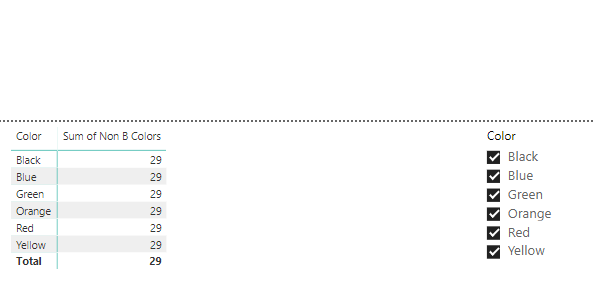
Now when I deselect Yellow, I still see the same results, this is because of the ALL function. I would like the measure to display 21 when Yellow is deselected. How can I accomplish this?
Thank you!
Solved! Go to Solution.
Hi, try with this:
SumNonBColor =
CALCULATE (
SUM ( Table1[Amount] ),
FILTER ( ALLSELECTED ( Table1[Color] ), LEFT ( Table1[Color] ) <> "B" )
)
Regards
Victor
Hi, try with this:
SumNonBColor =
CALCULATE (
SUM ( Table1[Amount] ),
FILTER ( ALLSELECTED ( Table1[Color] ), LEFT ( Table1[Color] ) <> "B" )
)
Regards
Victor
This is perfect,
Thanks.
If you have recently started exploring Fabric, we'd love to hear how it's going. Your feedback can help with product improvements.
A new Power BI DataViz World Championship is coming this June! Don't miss out on submitting your entry.
Experience the highlights from FabCon & SQLCon, available live and on-demand starting April 14th.
| User | Count |
|---|---|
| 47 | |
| 44 | |
| 40 | |
| 20 | |
| 15 |
| User | Count |
|---|---|
| 70 | |
| 68 | |
| 32 | |
| 27 | |
| 25 |