This time we’re going bigger than ever. Fabric, Power BI, SQL, AI and more. We're covering it all. You won't want to miss it.
Learn moreLevel up your Power BI skills this month - build one visual each week and tell better stories with data! Get started
Hello all,
I am looking to create a measure that uses the ALL DAX function, but also takes into account filters that the user may explicitly filter out. Here is a quick example that I created for testing purposes:
ColorAmount
| Red | 1 |
| Blue | 2 |
| Black | 3 |
| Red | 4 |
| Blue | 5 |
| Black | 6 |
| Orange | 7 |
| Yellow | 8 |
| Green | 9 |
Using the above data I created a measure that uses the ALL function and sums the colors that do not begin with B:
Sum of Non B Colors =
CALCULATE(
SUM(Table1[Amount]),
ALL(Table1),
LEFT(Table1[Color],1) <> "B"
)
This produced the following results:
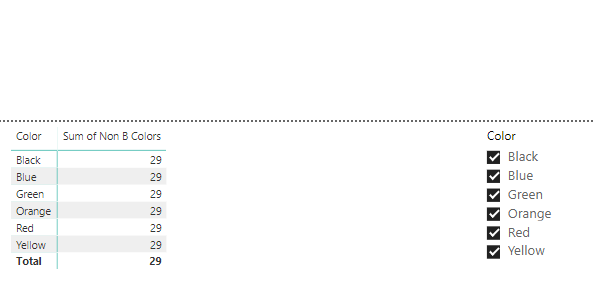
Now when I deselect Yellow, I still see the same results, this is because of the ALL function. I would like the measure to display 21 when Yellow is deselected. How can I accomplish this?
Thank you!
Solved! Go to Solution.
Hi, try with this:
SumNonBColor =
CALCULATE (
SUM ( Table1[Amount] ),
FILTER ( ALLSELECTED ( Table1[Color] ), LEFT ( Table1[Color] ) <> "B" )
)
Regards
Victor
Hi, try with this:
SumNonBColor =
CALCULATE (
SUM ( Table1[Amount] ),
FILTER ( ALLSELECTED ( Table1[Color] ), LEFT ( Table1[Color] ) <> "B" )
)
Regards
Victor
This is perfect,
Thanks.
Check out the April 2026 Power BI update to learn about new features.
Sign up to receive a private message when registration opens and key events begin.
If you have recently started exploring Fabric, we'd love to hear how it's going. Your feedback can help with product improvements.
| User | Count |
|---|---|
| 35 | |
| 32 | |
| 25 | |
| 22 | |
| 18 |
| User | Count |
|---|---|
| 67 | |
| 36 | |
| 32 | |
| 25 | |
| 23 |