cancel
Showing results for 
Search instead for 
Did you mean: 

The Power BI Data Visualization World Championships is back! It's time to submit your entry. Live now!

Reply
systemic_till
Regular Visitor

USERELATIONSHIP needs selection to trigger correct calculation of measure? What am I missing?

Hey,

This might be a stupid question, but I seem to have a general misunderstanding when using Measures, Filters and the DAX USERELATIONSHIP function.

I seems to work just fine for my dataset, but I always need to make a selection thus filter the data for which it then evaluates the measure using USERELATIONSHIP correctly. If I unselect everything it seems to ignore the USERELATIONSHIP calculation and gives the results without it.


I just have 2 tables with an inactive relationship:
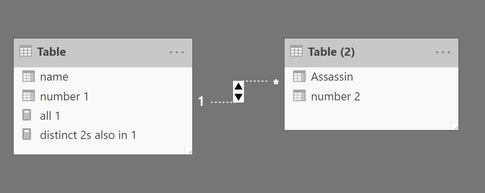
Capture4.PNG


My measure is showing distinct values as such:


distinct 2s also in 1 =
CALCULATE (
DISTINCTCOUNT('Table (2)'[number 2]) ,
USERELATIONSHIP (
'Table'[number 1],
'Table (2)'[number 2]
)
)
 
My expected outcome here would be 2, yet it shows as 3. 
It is counting the number 2 value '9' which is not in Table 1.
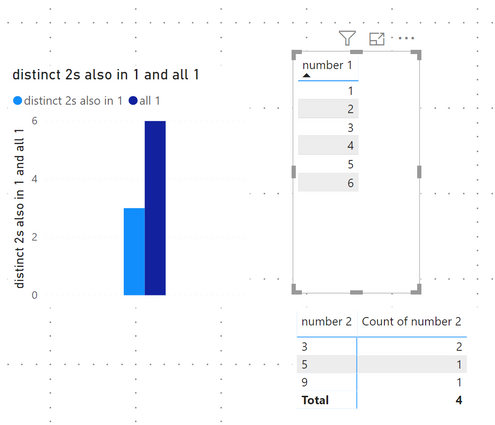
Capture.PNG

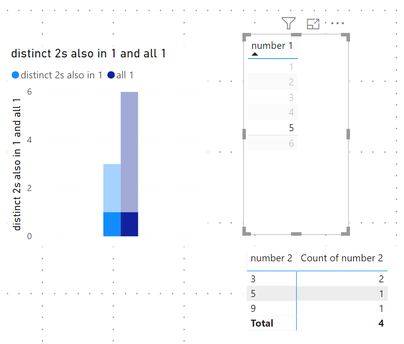
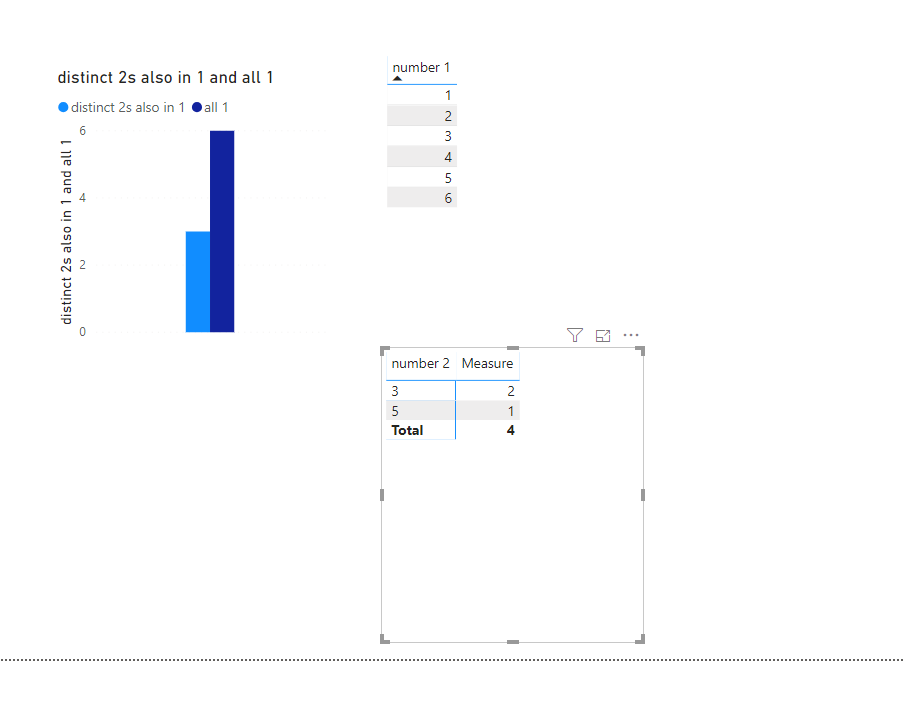
If I make a selection in the number 1 table it shows the values correctly as only '1'
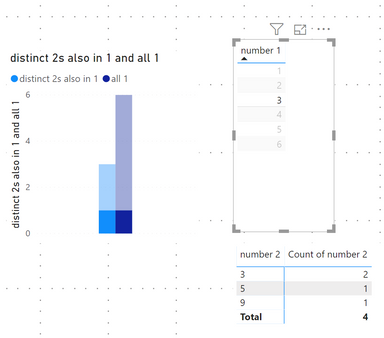
Capture2.PNGCapture3.PNG


How can I get the result of '2' for my measure posted above that works without a selection?


I uploaded a very simple pbix file to show what I mean.

Thanks for your help.


2 REPLIES 2
Anonymous
Not applicable

Hi @systemic_till ,

You can add write measure to calculate table2 records with if statement to compare current row contents with tbale1 records:

Measure =
IF (
    SELECTEDVALUE ( 'Table (2)'[number 2] ) IN VALUES ( 'Table'[number 1] ),
    CALCULATE (
        COUNT ( 'Table (2)'[number 2] ),
        USERELATIONSHIP ( 'Table'[number 1], 'Table (2)'[number 2] )
    )
)

18.png

If above not help, please explain your requirement more clarify with the expected result.

Regards,

Xiaoxin Sheng

Hi @v-pn ,
Thanks for you answer.
It didn't clarify my issue though.

In my setup, everything works as expected, if I make a selection.
Only when nothing is selected I am getting confusing results.

My expected result is 2, when nothing is selected.
Yet, I get a result of 3 as if the USERELATIONSHIP filter was missing entirely.

So, to clarify:


// Measure 1

no relationship = CALCULATE (DISTINCTCOUNT('Table (2)'[number 2])   
==> that gives 3. That's ok.


//Measure 2
distinct 2s also in 1 =

CALCULATE (DISTINCTCOUNT('Table (2)'[number 2]) ,
USERELATIONSHIP (
'Table'[number 1],
'Table (2)'[number 2]
))                                                                                           

==> that also gives 3 when no selection is made. Why is it not 2?

Helpful resources

Announcements
Power BI DataViz World Championships

Power BI Dataviz World Championships

The Power BI Data Visualization World Championships is back! It's time to submit your entry.

January Power BI Update Carousel

Power BI Monthly Update - January 2026

Check out the January 2026 Power BI update to learn about new features.

FabCon Atlanta 2026 carousel

FabCon Atlanta 2026

Join us at FabCon Atlanta, March 16-20, for the ultimate Fabric, Power BI, AI and SQL community-led event. Save $200 with code FABCOMM.