Get certified for free when you join Fabric Data Days 2026 and dive into Fabric, Power BI, SQL, AI, and other essential data skills.
Join nowJuly 28 - August 9 | Final Round of the Power BI Dataviz World Championships. This is your chance. Learn more
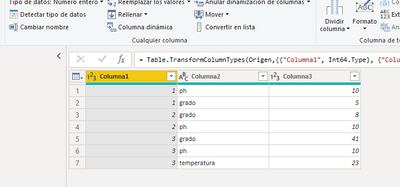
Is it possible to transpose the table in this way?
I have tried with Transpose and undo dynamization of powerbi columns but I have not been able to do it.
the result should look like this
| columna1 | ph | grado | temperatura |
| 1 | 10 | 5 | |
| 2 | 10 | 8 | |
| 3 | 10 | 41 | 23 |
here is the pbix
https://www.dropbox.com/s/mzqzwokd0mvxiuw/transpose.pbix?dl=0
thank you in advance for your help
Solved! Go to Solution.
You can Pivot (from the Transform menu in Power Query) Column2 using Column3 in Values.
With the data provided - 'Don't Aggregate' should work (from the Advanced options)
You can Pivot (from the Transform menu in Power Query) Column2 using Column3 in Values.
With the data provided - 'Don't Aggregate' should work (from the Advanced options)
¡¡thank you very much HotChilli!!
Join us in Barcelona for FabCon and SQLCon, the Fabric, Power BI, SQL, and AI community event. Save €200 with code FABCMTY200.
If you love stickers, then you will definitely want to check out our community sticker challenge, Barcelona edition!
Check out the July 2026 Power BI update to learn about new features.
| User | Count |
|---|---|
| 26 | |
| 24 | |
| 23 | |
| 19 | |
| 17 |
| User | Count |
|---|---|
| 31 | |
| 28 | |
| 21 | |
| 19 | |
| 17 |